VIP perks break when staff have to remember everything
VIP perks sound simple until staff have to manage them by hand.
A supporter earns a rank, wins an event, or gets temporary access. Now someone has to assign the Discord role, set the right in-game permissions, remember whether the perk applies to one server or every server, remove expired access later, and answer support questions when something does not match.
That is where VIP perks become an operations problem.
The cleaner approach is to map perks to roles, permissions, timed roles, Discord role sync, modules, and server actions where those workflows are supported. Takaro helps community managers organize that layer so supporter benefits are easier to grant, easier to understand, and easier to remove when access changes.
The real job: give supporters what they were promised
Most communities start with a simple promise: supporters should get something visible and useful.
The problem is delivery. A VIP member might need a Discord role, a game-server permission, a timed access window, a staff-visible note, or a server action that runs when their status changes. A donor rank might include cosmetic perks, community access, extra commands, or in-game rewards. A higher supporter tier might need different benefits across multiple servers.
Before creating a new tier, answer the questions staff will have to deal with later:
- Which benefits belong to each tier?
- Which benefits should be temporary?
- Which benefits should follow the player across servers?
- Which benefits should appear in Discord?
- Which benefits need staff visibility?
- Which benefits need a server action, command, or module?
- What happens when the tier expires, changes, or is removed?
If those answers live only in staff memory, the tier will create more work every time someone joins, upgrades, expires, or asks why their role is missing.
Build the tier around access, not just rank names
Before creating a VIP, supporter, donor, member, or subscriber tier, define the benefits as operations, not only as labels.
1. Start with what the tier actually controls
A tier should map to concrete benefits. Avoid creating a rank name first and figuring out the details later.
Useful categories include:
- Access: channels, servers, commands, areas, or tools.
- Visibility: Discord roles, staff indicators, player labels, or community recognition.
- Duration: temporary roles, trial perks, expiring benefits, or event-limited access.
- Actions: messages, server commands, item grants, role grants, or other supported workflows.
- Support: priority help, private channels, or admin visibility.
- Community participation: events, minigames, rewards, or progression systems where supported.
Keep each benefit specific enough that staff can tell whether it was granted correctly. “VIP” is not enough. “VIP can use this command on this server for 30 days” is much easier to operate.
2. Decide whether the benefit is global or server-specific
Takaro player roles can be global across all game servers or specific to one game server. That matters when supporters play across different parts of the community.
A global role is useful when a benefit should follow the player everywhere in the community. A game-server-specific role is useful when a benefit should apply only to one server, one ruleset, or one part of the community.
Roles are additive. If a player has one global role and one server-specific role, Takaro combines those permissions to decide what the player can do. That lets a community separate broad supporter status from narrow server-level access.
For example, a player might have a global supporter role that marks them as a community supporter, while a specific server grants an additional command or permission only on that server. Not every benefit needs to be global.
3. Stop letting temporary access become permanent by accident
Some benefits should last until a staff member changes them. Others should expire automatically.
Timed access is useful for trial perks, temporary VIP status, event rewards, limited promotions, or short-term supporter benefits. Permanent roles are better for staff roles, trusted community members, long-running supporters, or stable permissions.
If a tier has an expiration date, the community needs a plan for both granting and removing the benefit. Otherwise staff end up cleaning up old roles, permissions, and access by hand.
4. Keep Discord roles and server access in sync
Discord is often where the community sees the tier first. A supporter role can make status visible, unlock support channels, and help staff understand who belongs where.
But Discord status and game-server access are not the same thing. A clean setup defines which Discord roles are only social signals and which roles should connect to server-side permissions or actions.
Takaro’s Discord integration treats role synchronization as a mapped-role workflow. Users need to link their Discord account, the Discord bot needs to be connected, and roles need to be mapped between Discord and Takaro. Once configured, only mapped roles synchronize.
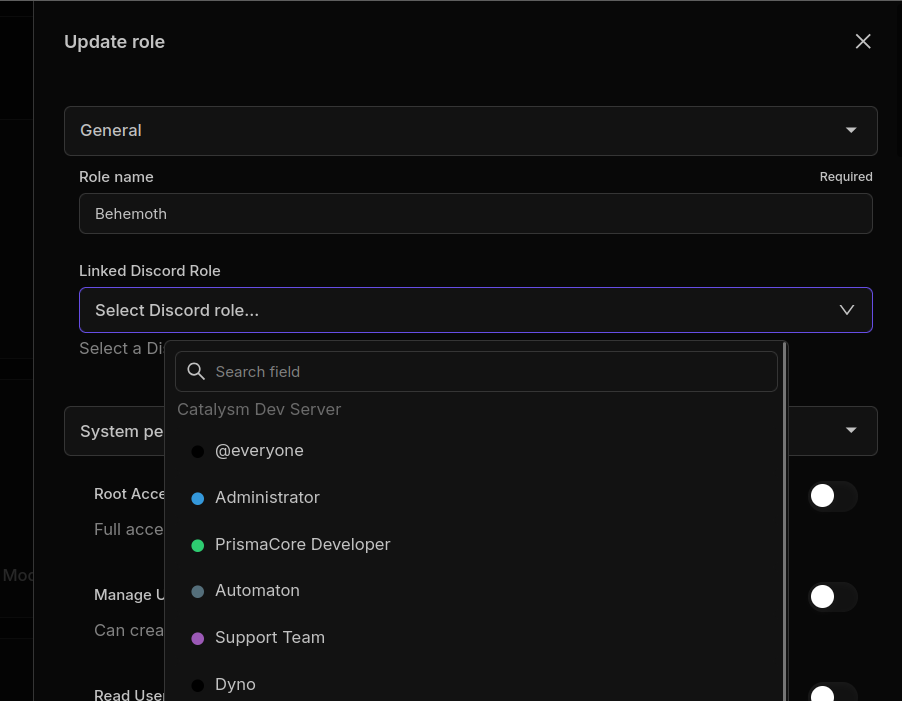
For example:
- A Discord role might unlock a private channel.
- A game-server role might control commands or access.
- A timed role might expire after a specific period.
- A module or server action might deliver a supported reward.
Those pieces should be designed together, not treated as separate admin chores. Otherwise Discord says one thing, the server says another, and staff have to clean it up.
The setup also needs a source-of-truth decision. In Takaro, role sync can be enabled for the game server, and the “Prefer Discord” setting decides which side wins during synchronization. When “Prefer Discord” is enabled, Discord roles override Takaro roles. When it is disabled, Takaro roles override Discord roles. Only roles linked between the two systems are affected.

Example: map one VIP role before building the whole system
Start with one role that already creates staff work.
For example, a community might create a Takaro role for a supporter tier, then link it to a matching Discord role in the role editor. That gives staff one place to define the benefit instead of manually updating Discord and game-server access separately.
A simple first pass could look like this:
- Takaro role:
VIP - Linked Discord role:
VIP - Scope: one game server or all game servers
- Duration: permanent or timed
- Source of truth: leave “Prefer Discord” off if Takaro should control the role, or enable it if Discord should control the role
That is enough to test the workflow with a small group before adding more perks, commands, rewards, or automation around it.
Want to map the first role before designing every perk?
5. Make account linking part of the flow
Role sync depends on identity. Players need to link their Discord accounts before Discord roles can reliably connect to Takaro roles and in-game access.
Takaro’s player docs point users to /link, where logged-in users can connect their Discord account. Without account linking, a community might have a Discord member and an in-game player, but no reliable way to know they are the same person.
For a supporter-tier workflow, account linking is not just an onboarding step. It is what lets the community connect a Discord role to player access and server-side permissions.
6. Automate the repeated staff work
Not every perk needs automation. Some benefits are simple enough for staff to manage manually, especially in small communities.
Automation becomes more useful when the same action repeats often, touches multiple systems, or creates mistakes when done by hand. That might include granting a role, removing temporary access, sending a message, running a supported command, or coordinating a server-side action.
Takaro’s module system is relevant here because modules can include commands, event hooks, cron jobs, reusable functions, permissions, configuration, and persistent variables. That gives communities a way to model recurring workflows without treating every benefit as a one-off staff task.
Specific module examples, rewards, kits, queue access, or game-specific behavior should be verified before public use. Different games and modules can have different support boundaries.
Where Takaro fits in the workflow
Takaro is a web-based, multi-gameserver manager for gaming communities. It gives community managers a web interface and REST API for managing game servers, and it centers much of the product around modules and connector-backed workflows.
For VIP and supporter perk operations, the useful Takaro surfaces are:
- Global and game-server-specific roles for controlling where access applies.
- Additive permissions for combining broad community status with server-level benefits.
- Timed roles for temporary benefits.
- Discord role synchronization for mapped Takaro and Discord roles.
- Discord integration for chat bridge, commands, event notifications, and community-connected workflows.
- Modules for commands, hooks, cron jobs, configuration, and custom behavior.
- Server actions where supported.
- Player context around the community, server, and account.
That makes Takaro useful after a community has decided what its tiers should mean. It helps turn “VIP gets benefits” into a controlled operational setup: who gets access, whether that access is global or server-specific, where that access appears, what changes over time, and which actions need to happen around the player.
The docs also make the operational constraints clear. Role sync requires mapped roles, linked Discord accounts, and a Discord bot with the right permissions. Unmapped roles do not synchronize, system roles do not synchronize, and multiple Discord servers need server-specific mappings.
First tier setup checklist
Use this as a planning checklist before you build the first public tier.
- Name the tier in plain language.
- List the benefits players actually receive.
- Mark each benefit as permanent or timed.
- Decide which benefits should be global across the community.
- Decide which benefits should apply only to specific game servers.
- Decide which benefits appear in Discord.
- Map the relevant Discord roles to Takaro roles.
- Choose whether Takaro or Discord is the source of truth for mapped roles.
- Confirm players know how to link Discord accounts through
/link. - Decide which benefits affect game-server access or commands.
- Identify which actions can stay manual.
- Identify which actions should use roles, permissions, modules, or server actions.
- Define what happens when the tier expires or changes.
- Test the workflow with a small group before promoting it broadly.
The goal is not to create the biggest perk list. The goal is to create benefits the team can actually deliver without relying on staff memory.
Common mistakes to avoid
The first mistake is promising perks before the operational workflow exists. A public tier should not depend on staff remembering every manual step.
The second mistake is mixing social status and server permissions without a clear map. A Discord role, a game-server role, and a temporary access rule can all mean different things.
The third mistake is turning on role sync before checking the prerequisites. The bot needs permission to manage roles, mapped roles need to exist on both sides, players need linked Discord accounts, and the source-of-truth setting needs to match how the community actually operates.
The fourth mistake is treating every community module or workflow as universal. Verify support, game behavior, and module status before using a specific example in public copy.
Start with the perk your staff keeps fixing manually
VIP and supporter perks work best when they are designed as a system, but you do not have to model the whole community at once.
Start with one perk your staff already has to fix manually. Define who should get it, where it should appear, whether it should expire, which Discord and server roles are involved, and what needs to happen when access changes.
Takaro can help with that operations layer across game-server communities. Start by mapping one perk to the roles, Discord sync, and access rules it actually needs.
Ready to turn a VIP perk into a real workflow?