Takaro AI
Tell Takaro what you want. Approve what it does.
Takaro AI is the AI assistant built into your game server dashboard. Describe a module and it builds it. Ask why a command failed and it fixes it. It asks for your approval before it changes your server.
Build with AI
A new module in three steps, no code
Need a command, a reward or an announcement that no module has? Describe it.
- 01
Describe it
Open Modules and tell Takaro AI what the module should do, like "give players a reward when they log in each day".
- 02
Approve the plan
Takaro AI writes the module and tries it out on your server. Each change waits for your Approve or Deny.
- 03
Install it
The module goes live on your server. Open it to read the code or change a setting yourself.
Fix what broke
A command failed? Ask why.
Open the failed event and select Why did this fail?. Takaro AI reads the run and the module code, and tells you in plain words what went wrong and how to fix it. Your players keep the old version until the fixed one is saved and installed.
- Reads the failed run and the module's code, not just the error.
- Fix it with Takaro AI changes the module for you, after your approval.
Ask about your players
Answers in plain words, not log files
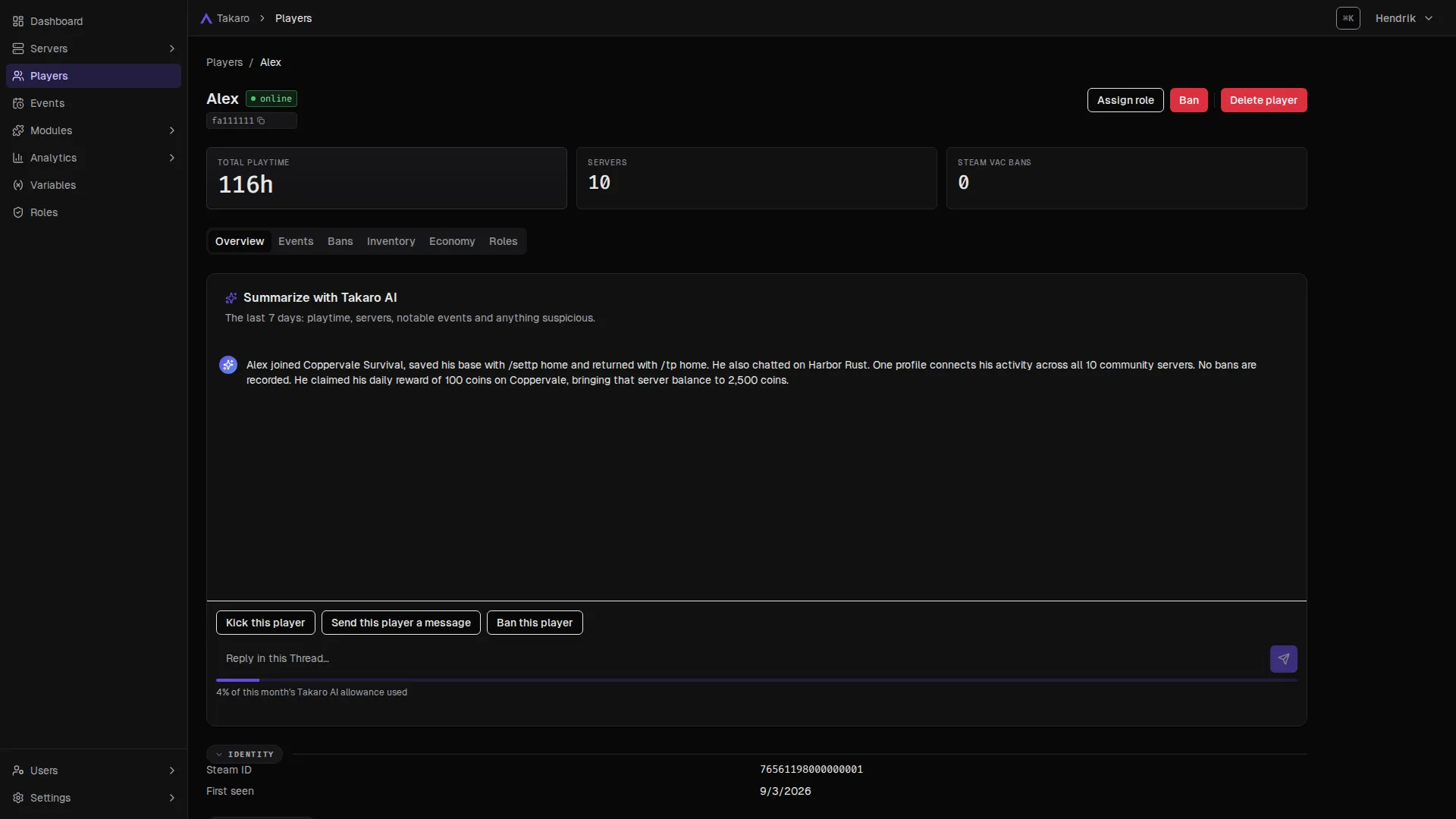
Open a player and select Summarize with Takaro AI: playtime, servers, notable events and anything suspicious from the last 7 days. The dashboard also opens with a daily briefing of what changed.
- Player summaries from their profile and history.
- Daily briefing on the dashboard.
Where you need it
Ask Takaro AI from any page
No separate tool to open. Takaro AI shows up where the question comes up.
-
Anywhere (press Ctrl+K)
Ask a question about your community: who is online, who was banned, what happened.
-
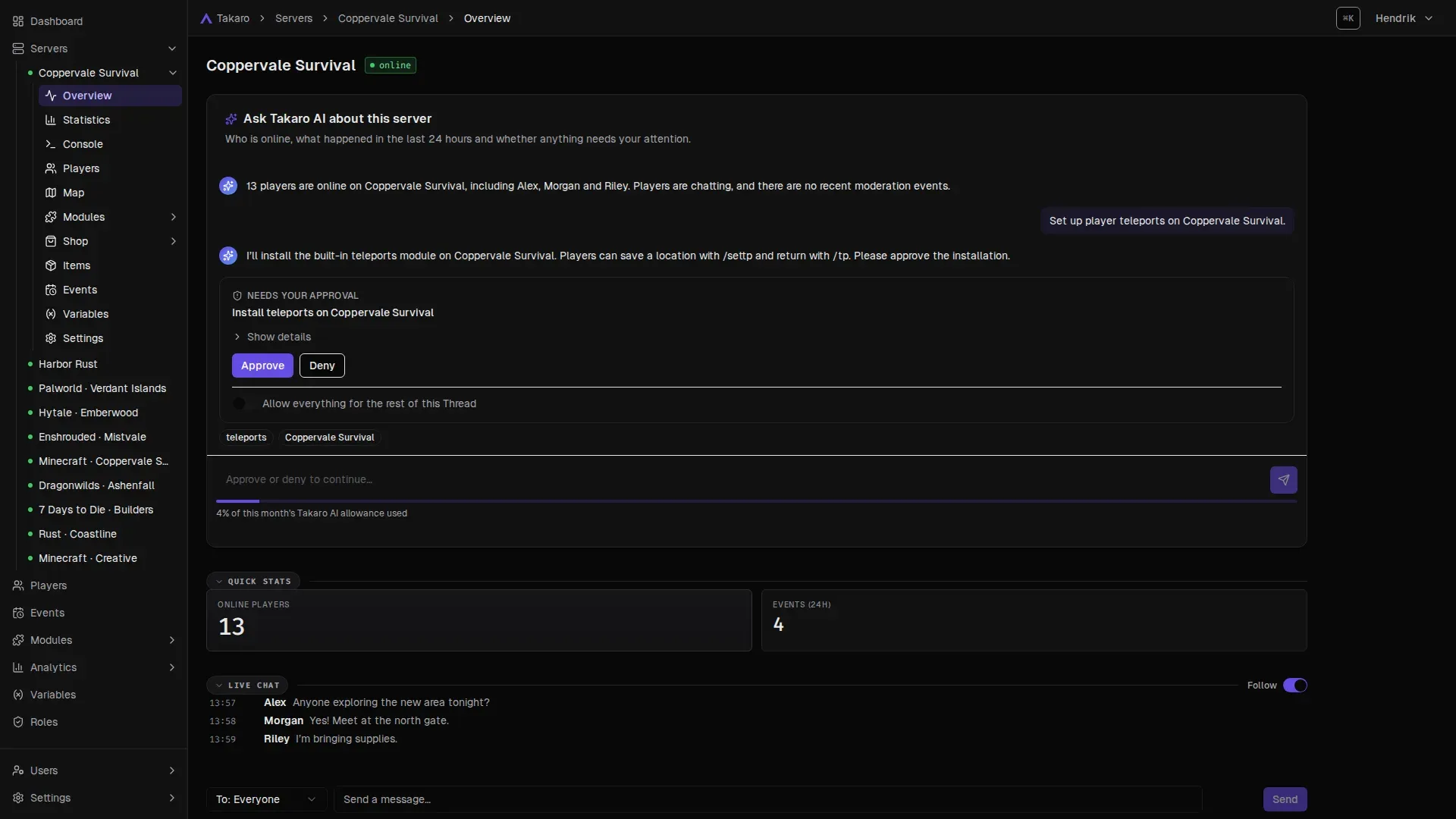
Server overview
Who is online, what happened in the last 24 hours and whether anything needs you.
-
Console
Describe what you want to do and get the console command for it.
-
Events
Describe the events you want, like "everything that failed last night".
-
Roles
Describe a role, like "can kick but not ban", and get the permissions filled in.
-
Installing a module
Each setting explained in plain words, with suggested values.
You stay in control
It asks first. Every time it matters.
Takaro AI shows what it wants to do on an approval card. Select Approve to go ahead or Deny to stop it. You can choose to allow everything for the rest of a conversation.
- Your permissions, nothing more. It can't do what you aren't allowed to do.
- Console commands always ask, even when you allow everything.
- Forms stay yours: suggested role permissions or settings are saved only when you press the button.
- An off switch for the whole community, under Settings.
Also works with your own assistant
Already use Claude or Codex?
Connect Claude, Claude Code or Codex to Takaro's MCP server at https://api.takaro.io/mcp.
Ask it for something and see the result in your dashboard.
- Signs in as you, with your permissions. No API keys to copy.
- A brake on deletes: if it deletes too fast, Takaro stops it and makes it ask you.
What is Takaro AI?
Takaro AI is the assistant built into the Takaro dashboard. Ask it about a server or a player, or ask it to set something up, like a module. It acts with your permissions and asks for your approval before it changes anything.
Can it change my server without asking?
Not unless you let it. Every change waits for your Approve. You can choose to allow everything for the rest of a conversation, but console commands still ask every time.
Can I build a module without writing code?
Yes. Describe what it should do and Takaro AI writes the module, tests it and installs it once you approve. You can open the module afterwards to read or edit the code. It can also change your existing modules, and it works on a copy of a built-in module, never the original.
Can I use it on the free plan?
Connect a game server first, then Takaro AI is ready to use. Your usage shows as a percentage under Settings → Billing.
Can I turn it off?
Yes. An admin can switch Takaro AI off for everyone in the community under Settings → General → Takaro AI.
Can I use Claude or another assistant instead?
Yes. Takaro has an MCP server (a standard way for AI assistants to use apps), so Claude, Claude Code and Codex can work with your servers too, as you and with your permissions. See Connect your AI assistant.
Can my own assistant delete things by accident?
It can only do what you can. If it starts deleting lots of things quickly, Takaro refuses the next delete for a minute and tells it to ask you first. Like any AI, it can misunderstand you, so check the result in the dashboard.
Let Takaro do the busywork.
Describe it, approve it, and get back to your players.
Not ready yet? Get the newsletter: new features, modules and tips. No spam.