Team Fortress 2 server admin tools for the reports that come in at 2am
A player is wiping your 2fort at 01:40 and nobody on staff is in game. Takaro records who joined, who killed whom and what they said in all chat and team chat, so a moderator can read the night from the browser and ban by SteamID, and the ban is still there after the next restart.
Windows or Linux dedicated servers. Players install nothing.
- Free for one server, with every module
- A SourceMod plugin in your tf folder. Nothing for players
- Bans keyed to the SteamID64, kept by the plugin across restarts
Tickets every TF2 server owner knows
"He's back. Didn't you ban him?"
A banid lives in memory. One restart, or a writeid nobody ran, and the same SteamID walks straight back onto the server.
With Takaro A ban from Takaro is kept by the plugin and applied again when the server starts. A timed ban is lifted by the server when it runs out.
"Can I have RCON so I can kick someone?"
The RCON password is all or nothing: whoever gets it for kicks can also run quit.
With Takaro Each moderator signs in with their own account and only the rights you give them. The console runs only the commands you list in the plugin's config.
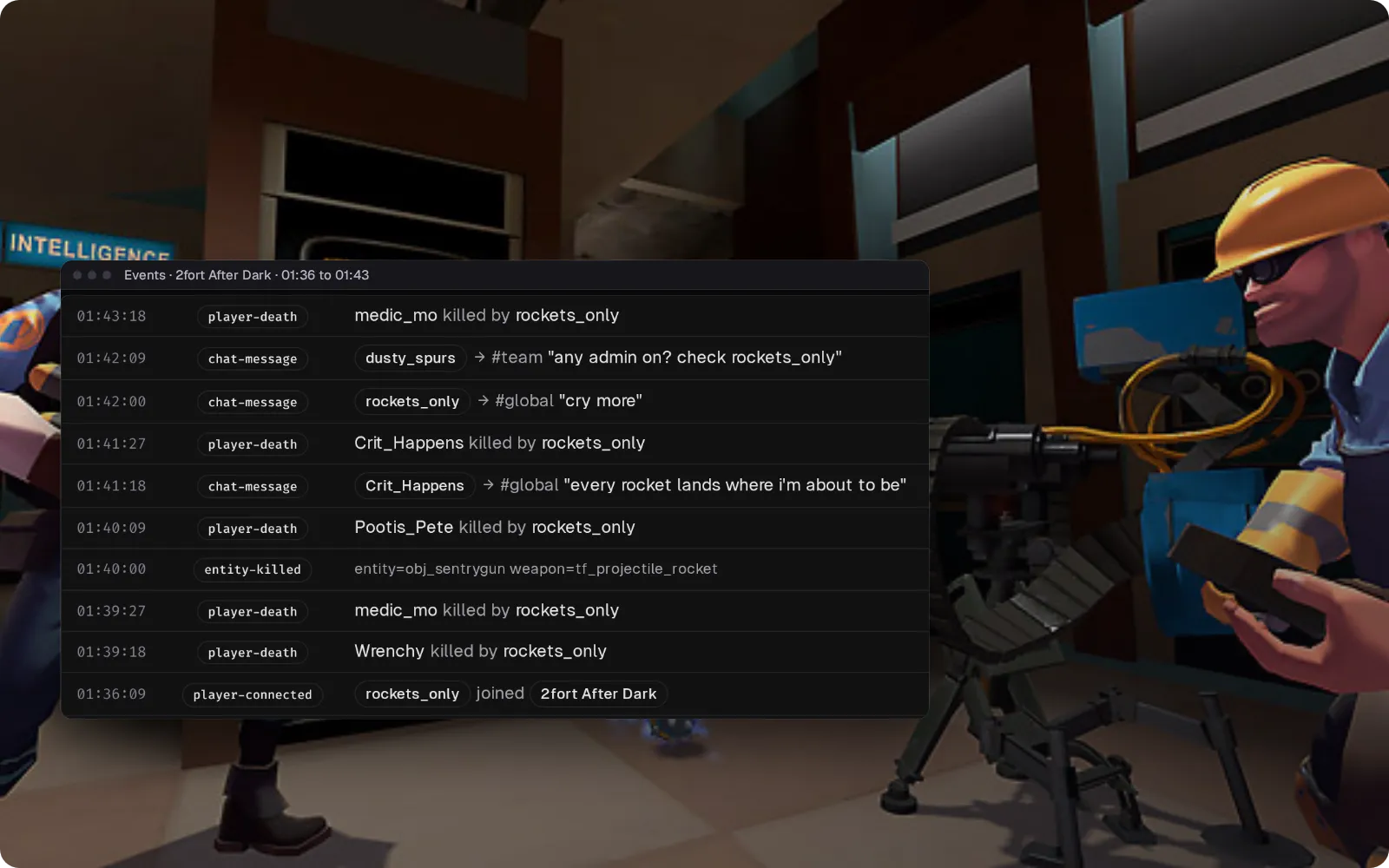
"Any admin on? Check rockets_only"
The report lands in team chat or Discord in the middle of the night, and by morning the scoreboard that proved it is gone.
With Takaro The Events page keeps the night: joins, every death with its killer, Engineer buildings destroyed with the weapon, and all chat and team chat lines.
The 01:40 report, handled from the browser
(1) Open the Events page for the reported player and read what they did tonight: when they joined, the sentry and dispenser they took down and with what, who killed them, what they wrote. (2) Write the reason and choose when the ban ends. (3) Press Ban player: they're kicked and can't rejoin, and the plugin keeps the ban through a restart. Bans go by SteamID64, so start the server without -insecure.
How bans work →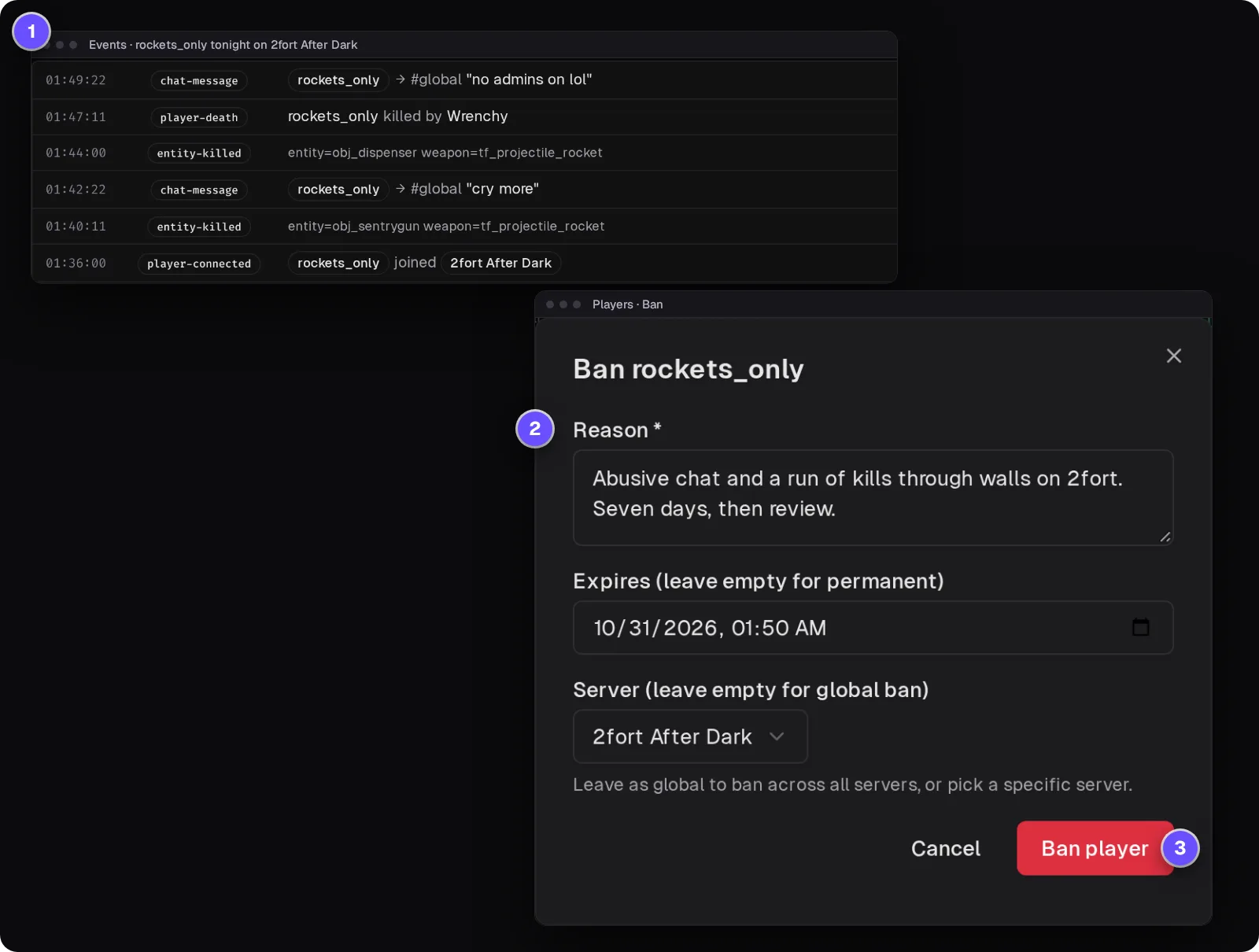
Answer the server from your Discord
Joins and game chat post to a Discord channel you choose, and what your staff write in that channel shows up in TF2 chat behind a green [Takaro] tag. A moderator can tell the server a report was handled without launching the game.
Set up the Discord bridge →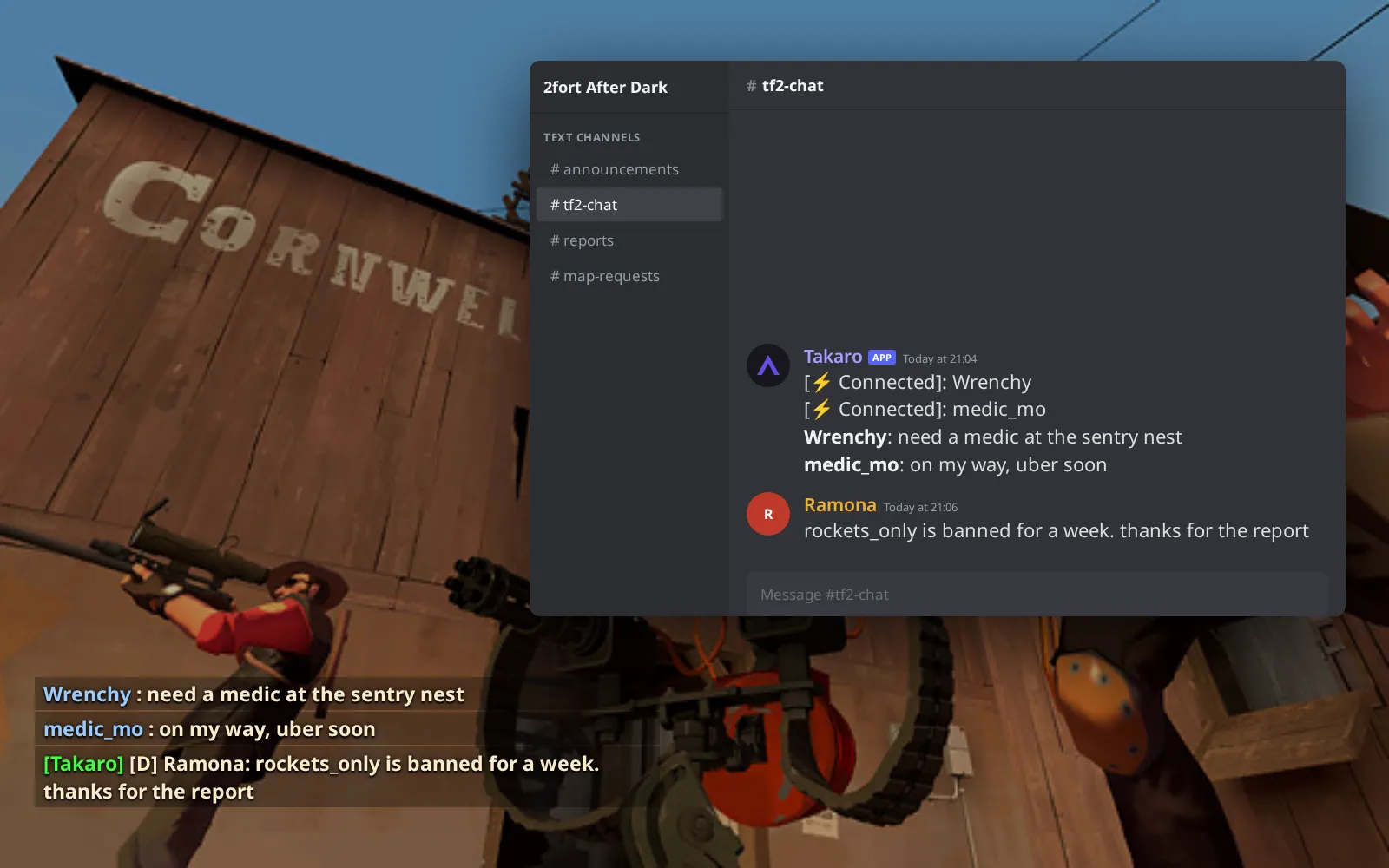
Everything else for your Team Fortress 2 server
Bans that outlast a restart
Takaro bans are stored by the plugin and applied again at startup. Permanent bans from banned_user.cfg show in the same list, though those are lifted in game.
Console commands you allow, nothing else
List exact commands like status or prefixes like sm_slay in the plugin's config. Anything else sent from Takaro is refused.
Who keeps taking out the sentry nest
Sentry gun, dispenser and teleporter kills are logged with the weapon, next to each death and its killer.
A login per moderator, not an RCON password
Give a trial moderator only the rights they need, and nobody has to share the RCON password to kick a player.
Download the Team Fortress 2 connector
SourceMod plugin for Team Fortress 2 dedicated servers (Windows or Linux) that connects to Takaro itself, no sidecar.
Before you start
- Team Fortress 2 dedicated server (Steam app 232250) on Windows or Linux
- MetaMod:Source 1.12 and SourceMod 1.13 on the server
- Takaro registration token
Latest release
Next steps
- Create the server in the Takaro dashboard and copy its registration token.
- Download the connector for Windows or Linux, unzip it into the server's
tffolder, and paste the code Takaro gives you intocfg/sourcemod/takaro_tf2.cfg.
Full Team Fortress 2 install guide →
Previous versions (1)
Free to start. Upgrade when you grow.
The free tier includes one server with all modules, full API access, and Discord integration. Paid plans start at €7.99/month.
Team Fortress 2 server management FAQ
Do TF2 bans made in Takaro survive a server restart?
Yes. The plugin keeps its own list of Takaro bans and applies it again whenever the server starts, and a timed ban is lifted by the server when it ends. The server must run with Steam authentication (no -insecure), because bans go by SteamID64.
Can I give a moderator kick and ban rights without the RCON password?
Yes. Each moderator has their own Takaro login with the rights you choose, and console commands sent from Takaro only run if they are on the allowlist in the plugin's config.
Which SourceMod version does the TF2 connector need?
SourceMod 1.13 with MetaMod:Source 1.12. SourceMod 1.12 crashes current TF2 builds. Each connector release names the TF2 server build it was tested on.
Does it work on a Linux TF2 server?
Yes. There is a Windows zip and a Linux zip with the same plugin; pick the one for the system your dedicated server runs on.
Can I connect my TF2 server chat to Discord?
Yes, both ways. Game chat and join notices go to a Discord channel, and messages from that channel appear in game. Bridging chat this way also works on our Rust server tools.
Can Takaro give TF2 items?
No. A TF2 server can't grant Steam items, so there is no item delivery. Takaro does see the weapons a player has equipped, by their in-game names.
Can I see TF2 players on a map in Takaro?
No. Takaro has no TF2 map, so players don't appear on one. The Events page shows who was on, who they killed and what they said.
Can I manage multiple Team Fortress 2 servers from one dashboard?
Yes. Add as many servers as your plan allows. The free tier includes one server; paid plans cover two to eight, all from a single dashboard.
Is Takaro a replacement for my server host?
No. Takaro is a management layer on top of the server you already run. You keep your hosting provider; Takaro connects to the server and adds economy, teleports, moderation and analytics.
Can I write custom modules?
Yes. Takaro modules are commands, hooks and cron jobs you can write yourself, and the REST API is open for anything a module cannot reach.
How much does it cost?
The free tier covers one server with every module included. Paid plans start at €7.99/month for two servers. See all plans.
Is Team Fortress 2 support official?
Yes. Takaro builds, tests and releases this connector itself, with versioned releases and a documented install. Bugs go to the connectors repository.
Ready to manage your Team Fortress 2 server?
Install the connector, connect, and start adding features in minutes.
Running more than one game?
One Takaro account runs every game below, with one player profile across all of them.