
Empyrion server admin tools that remember who was at the base, on every planet
Pick any player on your Empyrion server, pick the planet, and replay their evening: where they went, what they killed, when they died and what was in their toolbelt and backpack before and after. The next "our base was looted" or "the playfield ate my stuff" ticket starts from that record, not from two factions arguing in Discord.
One mod in the Windows dedicated server's Mods folder. Players install nothing.
- Free for one server, with every module
- A map for each planet your players have visited
- Reconnects by itself after a restart or a network drop
Tickets every Empyrion admin knows
"Our base was looted while we were offline"
Offline protection kicks in after a delay and covers only what your settings say. The faction knows what's missing. Nobody can say who stood inside.
With Takaro Pick the planet, draw a box around the base for the night and read who was inside, from when to when. Theft lists what they gained in there.
"The playfield reloaded and my backpack is gone"
A crash or a restart at the wrong moment, and an evening of mining is gone. The player wants it back, and all you have is their word for what they carried.
With Takaro Move the Tracker to the minute before the death, read the toolbelt and backpack, and give the same items back by name. Ship cargo isn't in that record, so that part stays your call.
"He logged off before I could ban him, and he plays on Epic"
Banning means a telnet window, the admin config file or being in game, and for an Epic player you first dig the ID out of the logs.
With Takaro Ban from his profile in the browser, Steam or Epic, for a set number of hours or days. It works while he's offline, and the ban list shows when it ends.
Who was at that base on Akua between 1 and 5 AM?
On the Tracker, the map's history view, pick the planet, (1) draw a box around the faction's base and (2) set the hours. Area search lists every player seen inside with the first and last time, and (3) the Theft tab lists what they gained while in there, here a Laser Pistol, 200 Cobalt Ingot, Promethium Pellets and an Assault Rifle. That's strong evidence, not proof: positions are samples, the game doesn't say where an item came from, and a faction mate gains items in their own base too. Look at the trail before you act on it.
How area search and Theft work →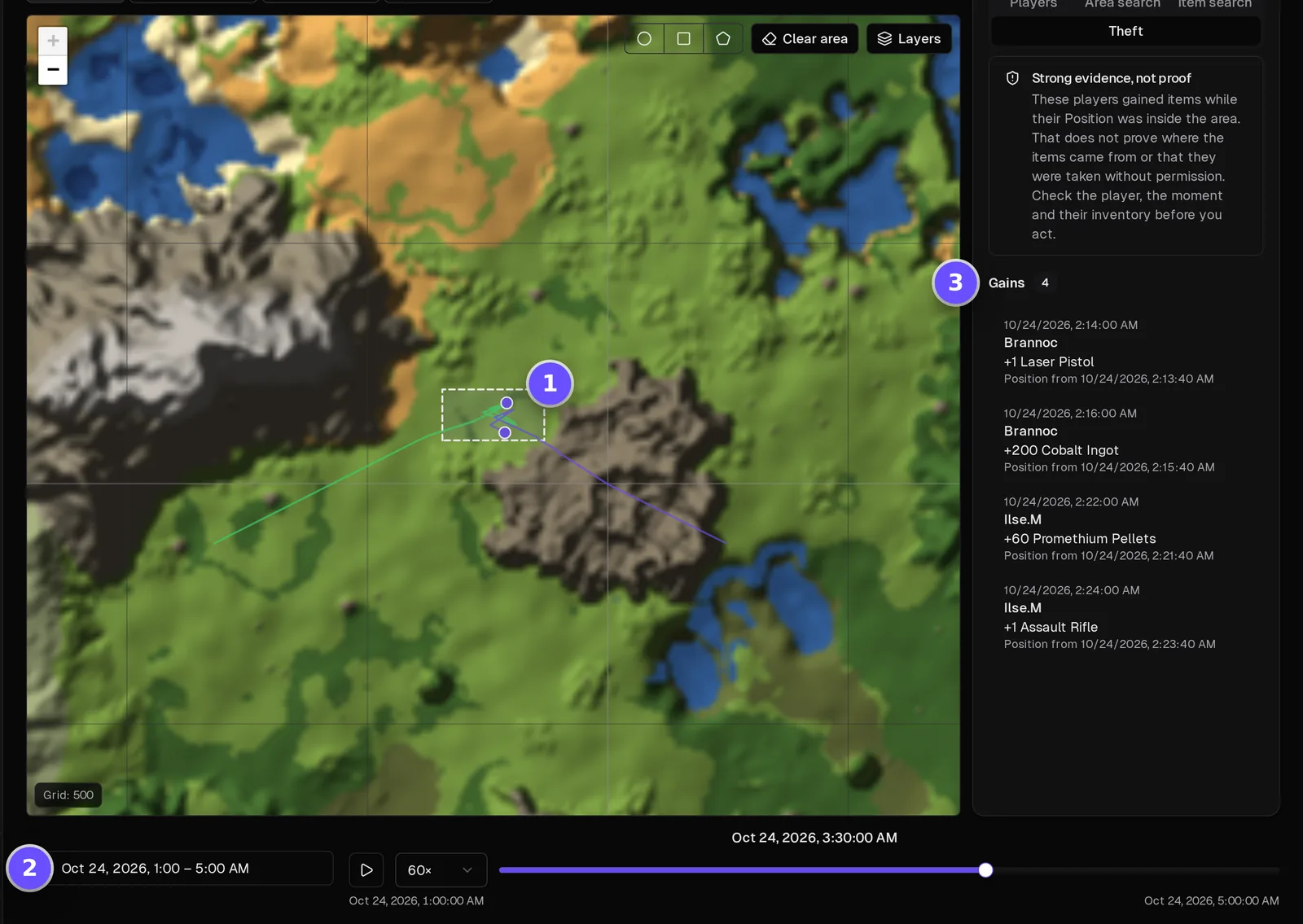
Give back what the playfield took, and only that
(1) Pick the player and move the Tracker to the minute before the death marker. The panel shows what was in their toolbelt and backpack at that moment. (2) Open Give Items from their profile, search each item by its in-game name and set the amount. (3) Press Give items and it lands in their inventory.
How the Tracker works →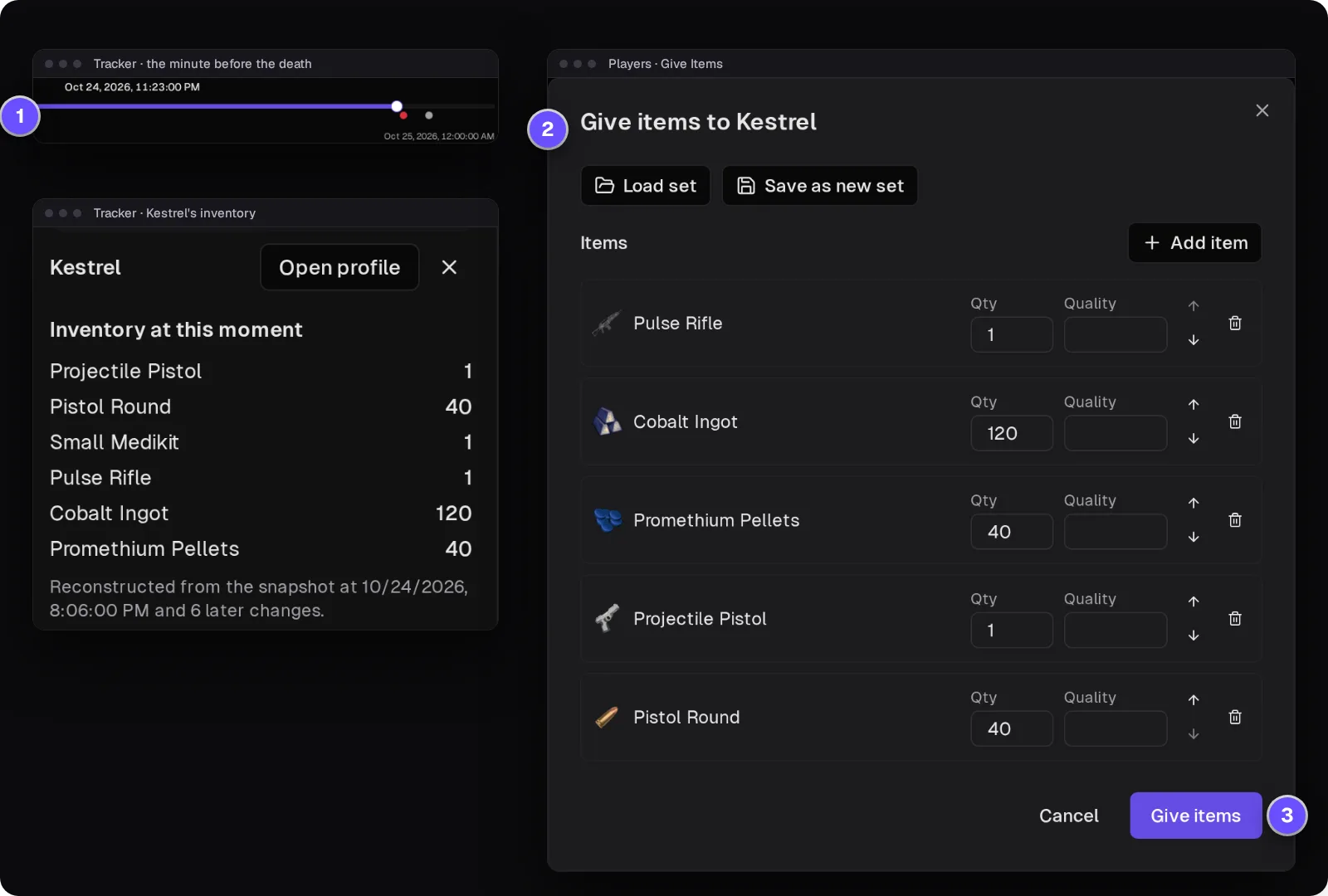
Ban the looter who already logged off
(1) Find him on the Players list, online or not, Steam or Epic. (2) Write the reason and pick when the ban ends; Empyrion counts bans in whole hours, and a ban with no end date lasts ten years, the longest the game allows. (3) Press Ban player. A timed ban lifts itself, and the server's ban list in Takaro shows when each one ends.
How bans work →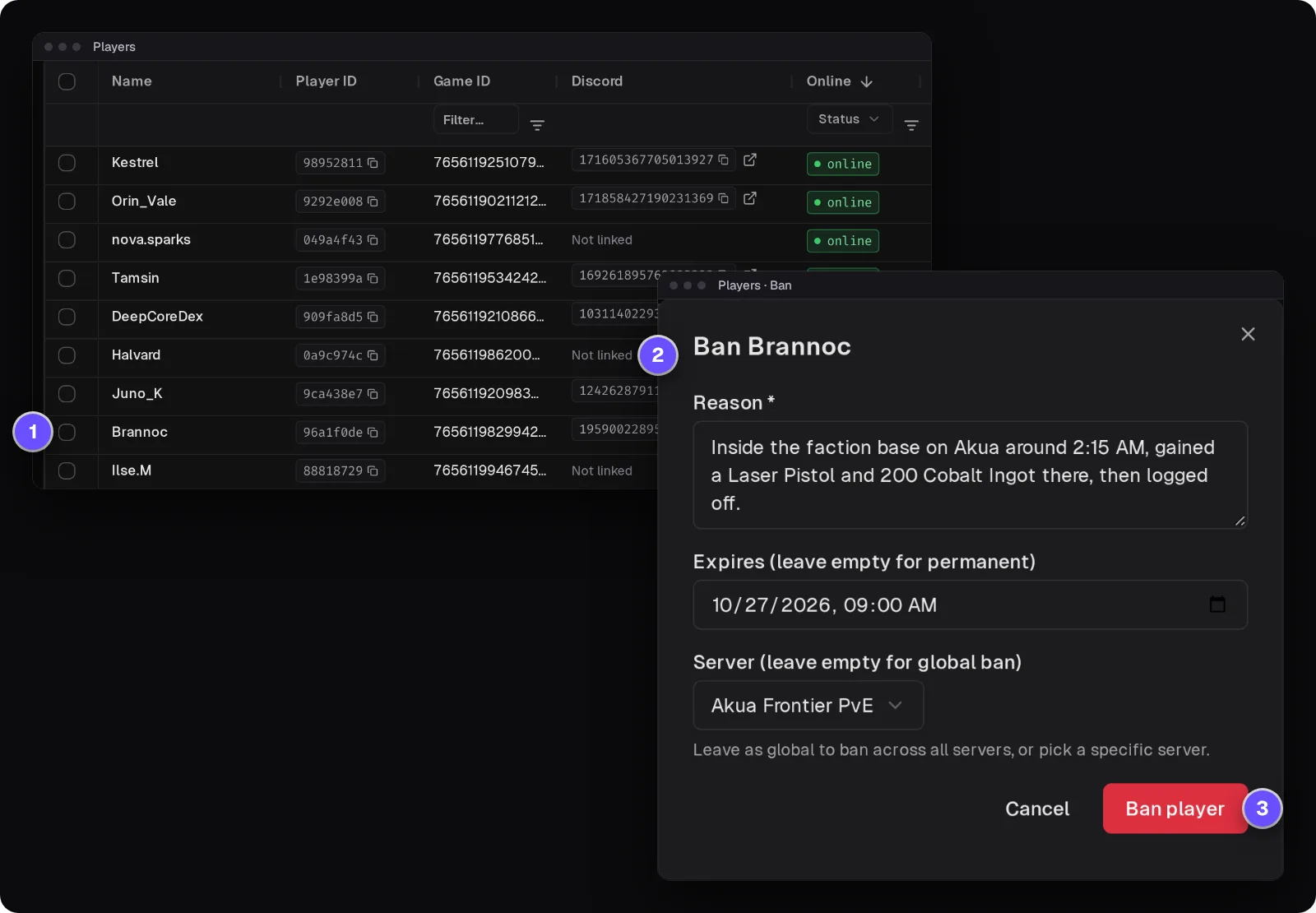
Everything one player did, in every chat channel
Filter the server's events to one player and read their evening in order: when they joined, what they said in global, faction and alliance chat, which creature they killed and with which weapon, what they bought, when they died and when they left. Faction chat shows as #team and alliance chat as #friends.
How the Tracker works →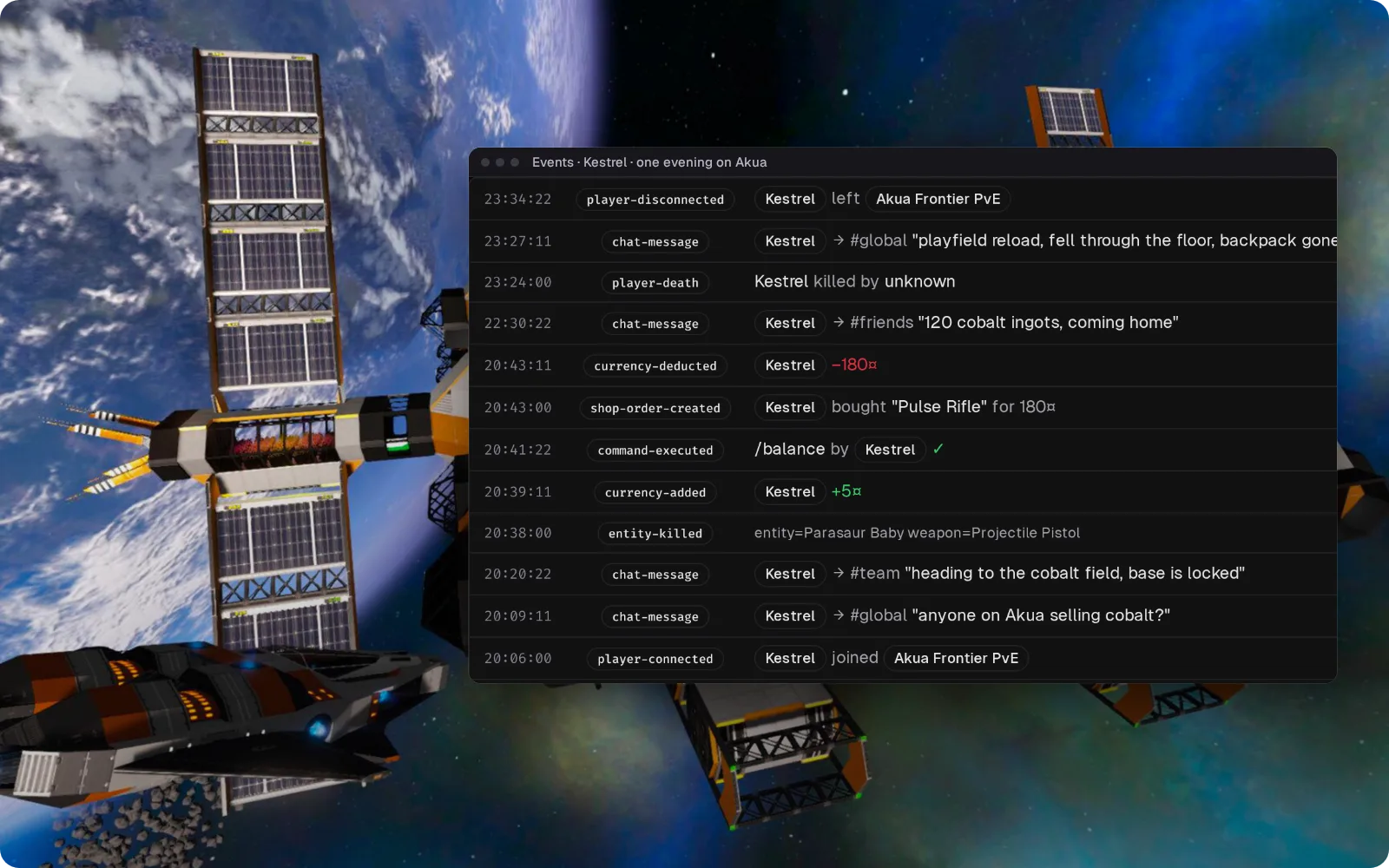
Answer "is Masperon up yet?" from Discord after a restart
Pick a Discord channel for game chat. Anything your staff types there appears in game with a [D] before their name. Joins are posted too, so you can watch players come back while the playfields load.
Set up the Discord bridge →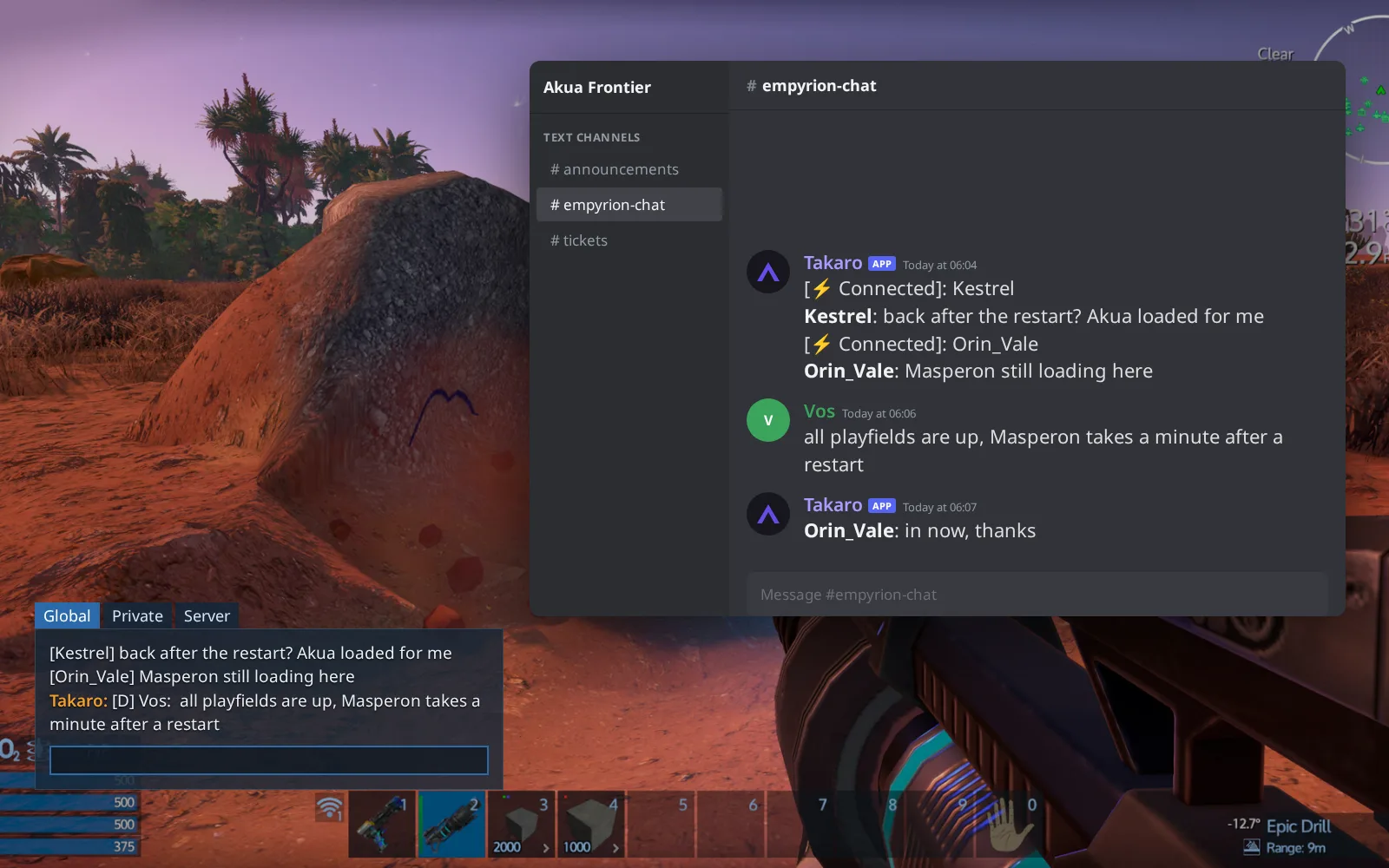
A storefront for credits, delivered to the inventory
(1) Your server's storefront page lists kits with their price, contents and the item's own picture, so players can plan before they log in. (2) Bought items go straight into the player's inventory, and Takaro confirms each one in their private chat. Players who buy while offline claim the order when they're back.
Browse the economy modules →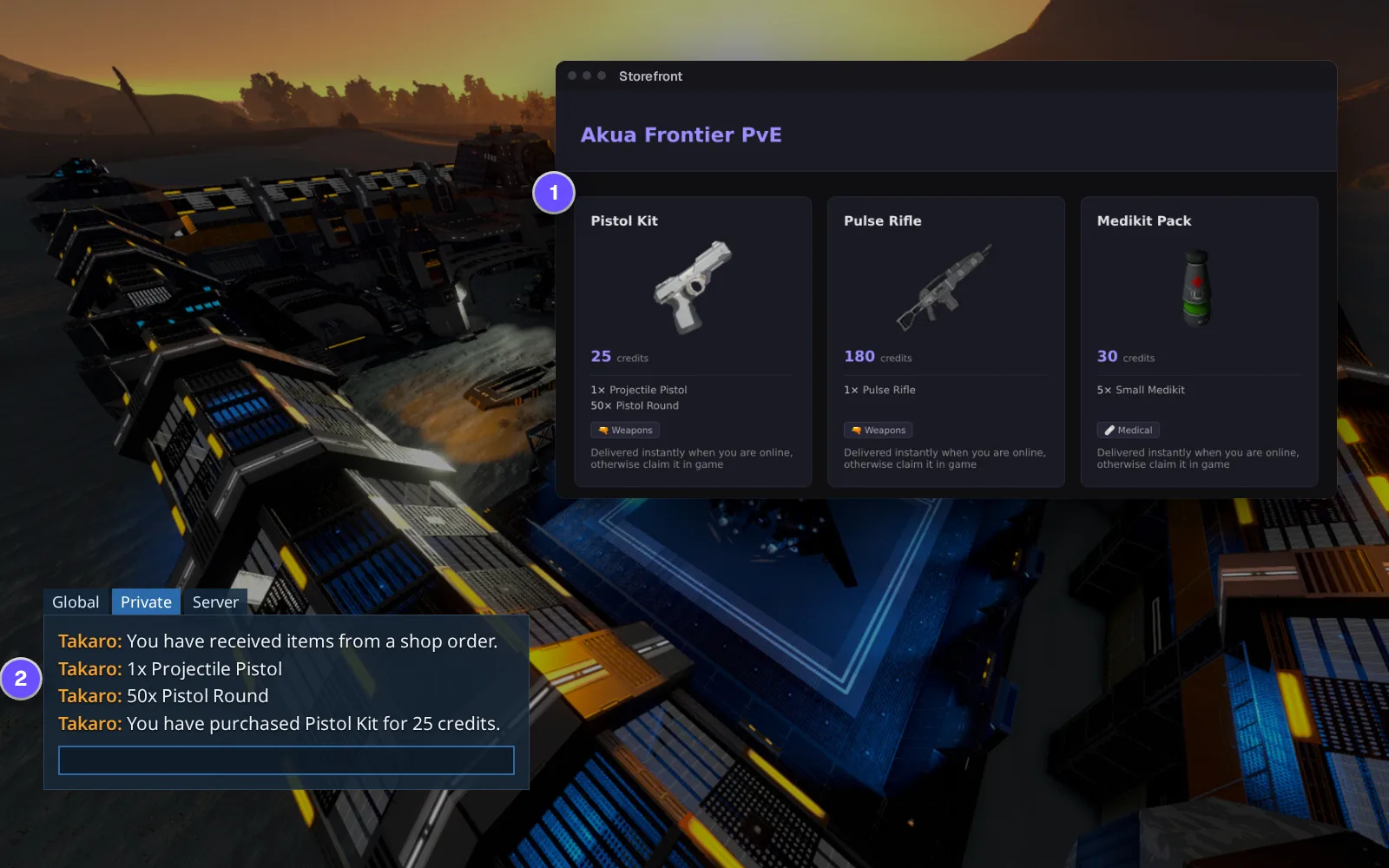
Everything else for your Empyrion - Galactic Survival server
Teleport to another planet
Move a player within their playfield or to another planet from the browser, for the one stuck in a broken playfield or under the terrain.
Items by name, not by ID
Search "Pulse Rifle" or "Cobalt Ingot" in the item list instead of looking up an item ID. It goes straight into the player's inventory.
Steam and Epic on one list
Steam players show with their SteamID64, Epic Games Store players with the game's own ID. Kick, ban and message both the same way.
The console commands you allow
Run the commands on your allowlist and read their real output, without a telnet client. It needs the server's telnet console turned on.
Download the Empyrion - Galactic Survival connector
Native connector for Empyrion dedicated servers: one C# mod, loaded by the game's own mod loader, that connects to Takaro itself, no sidecar.
Before you start
- Empyrion - Galactic Survival Windows dedicated server (Steam app 530870) build named in the release; it also runs under Wine
- File access to the server's Content\Mods folder
- Takaro registration token
Latest release
Next steps
- Create the server in the Takaro dashboard and copy its registration token.
- Stop the server, unzip the TakaroEmpyrion mod into
Content\Mods, copyTakaroConfig.txt.exampletoTakaroConfig.txt, paste the code Takaro gives you into it, and start the server again. It connects within seconds.
Free to start. Upgrade when you grow.
The free tier includes one server with all modules, full API access, and Discord integration. Paid plans start at €7.99/month.
Empyrion - Galactic Survival server management FAQ
Is there a web admin panel for an Empyrion server?
That's what Takaro is: kick, ban, message, teleport, give items and a map for each planet, in a browser tab, whoever hosts the server. It runs next to the tools you already use.
How do I ban a player on my Empyrion server who already logged off?
Open the player in Takaro and ban them for a number of hours or days. Empyrion counts bans in whole hours, and a ban without an end date lasts ten years. No admin config edit and no restart. See how bans work.
How do I ban an Epic Games player on Empyrion?
The same way as a Steam player. Takaro lists Epic players by the game's own ID, so you pick them by name instead of searching the logs for it.
How do I find out who looted a base on my Empyrion server?
Switch the map to Tracker, pick the planet, set the hours and draw around the base. You get everyone seen inside with their times, and Theft shows who gained items there: strong evidence, not proof. The same works on Rust.
Can I give items back to a player who lost them to a bug?
Yes. Check their inventory at the minute before the death on the Tracker, then give the items back by name. Takaro sees the toolbelt and backpack, not ship or container cargo.
Is there a map for every planet?
Each planet gets its own map once the server has generated its terrain, which happens when someone has been there. Players show on the planet or playfield they're on.
Can I connect my Empyrion server chat to Discord?
Yes, both ways. Players' messages appear in the Discord channel of your choice, and staff can answer them from there.
Does it work on a Linux Empyrion server?
The mod is built for the Windows dedicated server. It also runs when you host that server under Wine on Linux.
What happens after an Empyrion update?
Wait for a connector release that names the new server build, then stop the server, unzip it over the old one and start again. Your config, players and bans stay.
Can I manage multiple Empyrion - Galactic Survival servers from one dashboard?
Yes. Add as many servers as your plan allows. The free tier includes one server; paid plans cover two to eight, all from a single dashboard.
Is Takaro a replacement for my server host?
No. Takaro is a management layer on top of the server you already run. You keep your hosting provider; Takaro connects to the server and adds economy, teleports, moderation and analytics.
Can I write custom modules?
Yes. Takaro modules are commands, hooks and cron jobs you can write yourself, and the REST API is open for anything a module cannot reach.
How much does it cost?
The free tier covers one server with every module included. Paid plans start at €7.99/month for two servers. See all plans.
Is Empyrion - Galactic Survival support official?
Yes. Takaro builds, tests and releases this connector itself, with versioned releases and a documented install. Bugs go to the connectors repository.
Ready to manage your Empyrion - Galactic Survival server?
Install the connector, connect, and start adding features in minutes.
Running more than one game?
One Takaro account runs every game below, with one player profile across all of them.