
ARK: Survival Ascended admin tools that show who was at the base
Pick a survivor on your Ascended server and replay their night on The Island: the route they rode north to the snow, the Alpha Raptor and Carnotaurus they killed and with what, and the player who shot them at the cave. When a tribe reports an offline raid, you open that record instead of guessing from the tribe log.
One AsaApi plugin on a Windows dedicated server. Players install nothing.
- Free for one server, with every module
- Steam players keep the same profile as in your other Steam games
- Back online by itself within seconds of a network drop
Tickets every Ascended admin knows
"Our base got wiped while we were offline"
The tribe log says "destroyed", not by whom. Two tribes blame each other in Discord, and a rollback would punish the whole server.
With Takaro Circle the base on the Tracker for those hours and read every survivor seen inside, with the first and last time.
"He's under our foundations, ban him"
By the time you have the console open and the right ID copied, the mesher has logged out and there's nobody left to ban.
With Takaro Find him on the Players list, online or not, and ban him from the browser for a set time or for good. He's refused on his next join, also after a restart.
"Server's down again after the patch"
ARK pushes a server update, your mods and plugins need to catch up, and the same five people ask in Discord when you're back.
With Takaro Tell everyone in game on a schedule, shut down with the world saved, and greet players with your welcome message when they rejoin.
Who was inside the tribe base between 4 and 6 AM?
On the Tracker, the map's history view, (1) draw a circle around the base and (2) pick the hours of the raid. (3) Area search lists every survivor seen inside, with the first and last time and how many position samples put them there. Positions are samples taken seconds to about a minute apart, so read the trails before you act: it's strong evidence, not proof.
How area search works →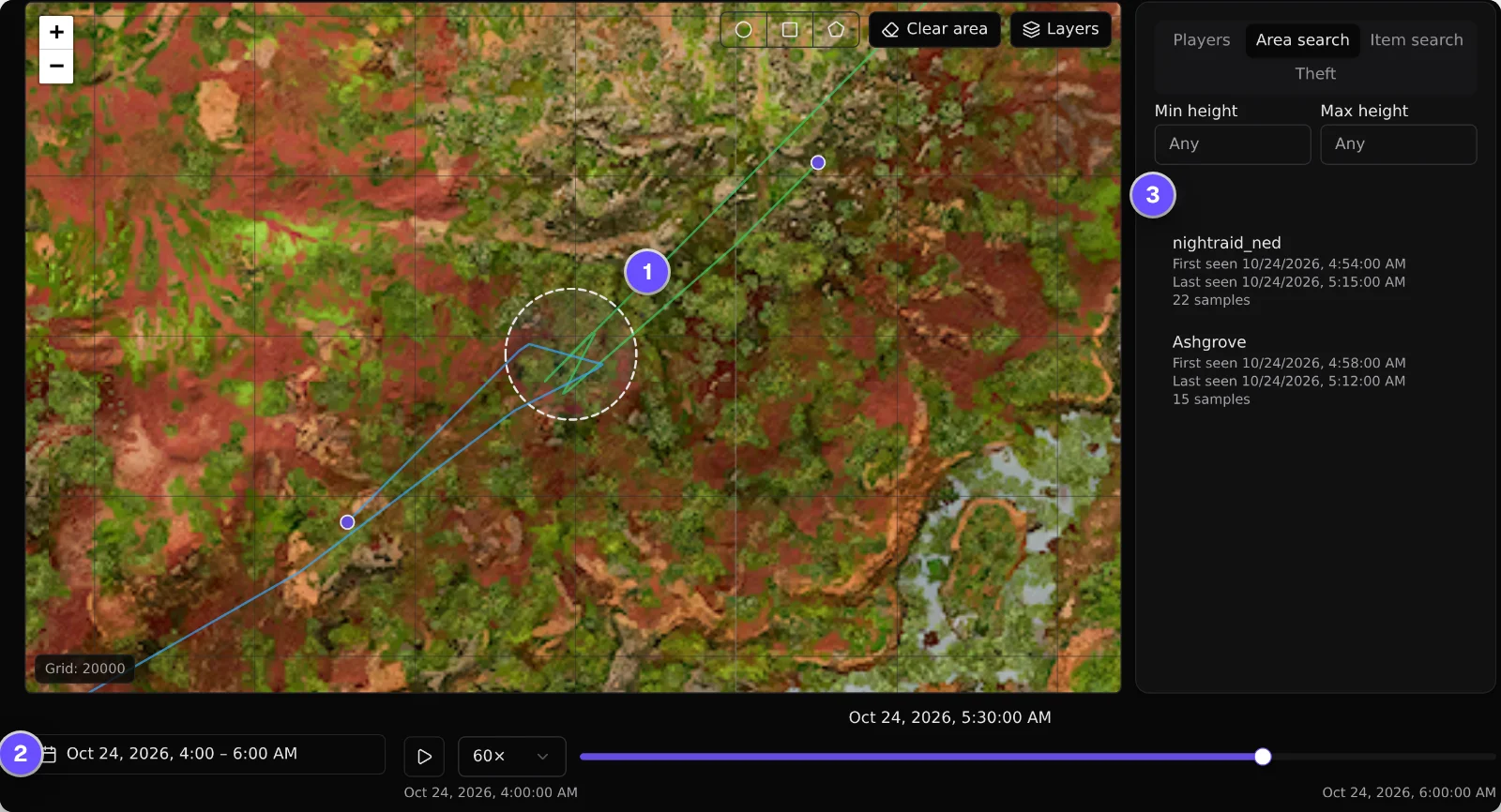
Ban the mesher who already logged off
(1) Find him on the Players list, online or not. (2) Write the reason and pick when the ban ends, or leave it empty for good. (3) Press Ban player. (4) When he tries to join again, ARK tells him he's banned from this server. The ban survives a server restart, and a timed one ends on its own.
How bans work →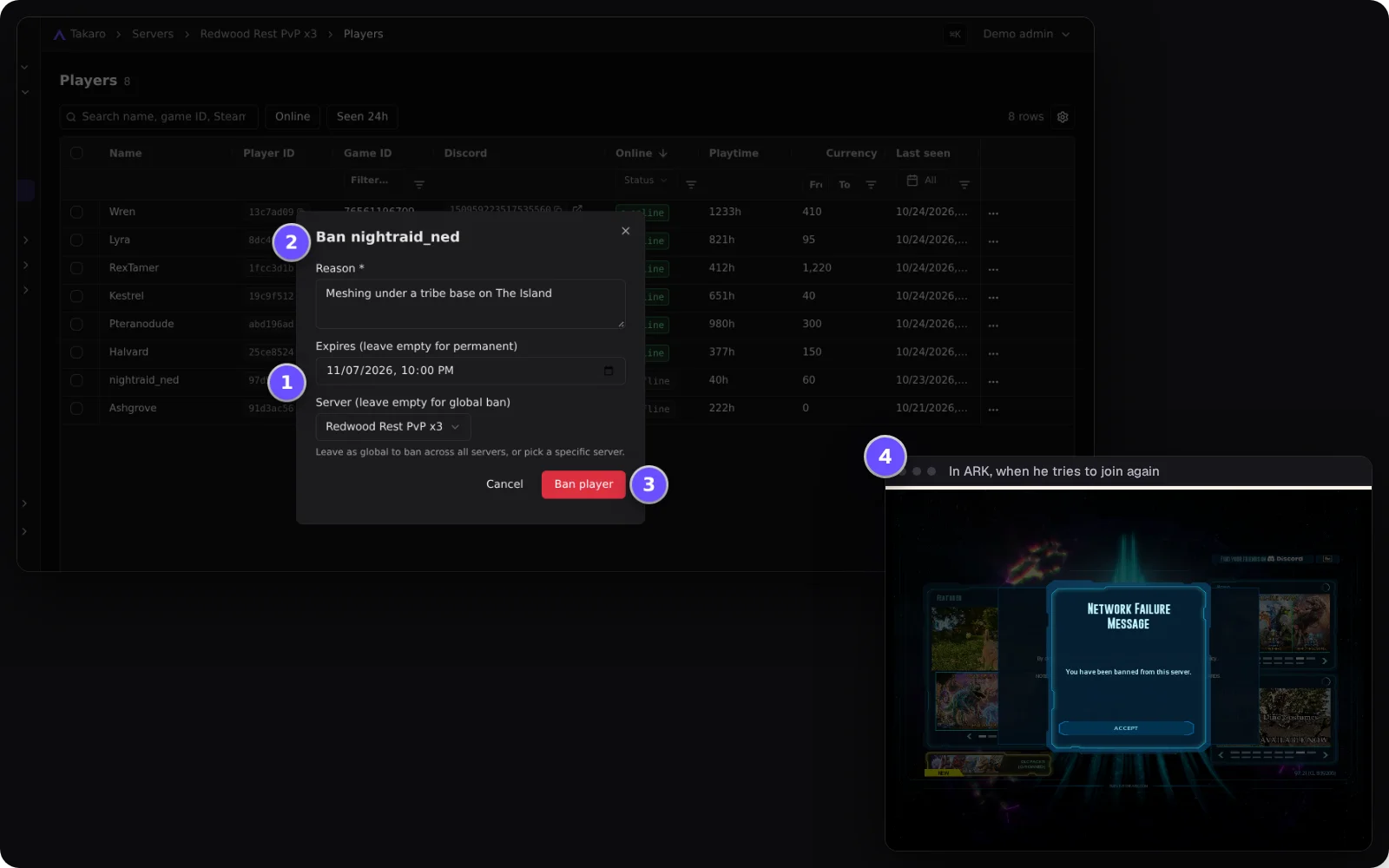
One survivor's night, top to bottom
Filter the server's events to one player and read it in order: when they joined, what they said in chat, what they bought, which creatures they killed and with which weapon, the points they earned, and who killed them. Kills by a tamed creature aren't reported, and a death names the killer only when it was another player.
How the Tracker works →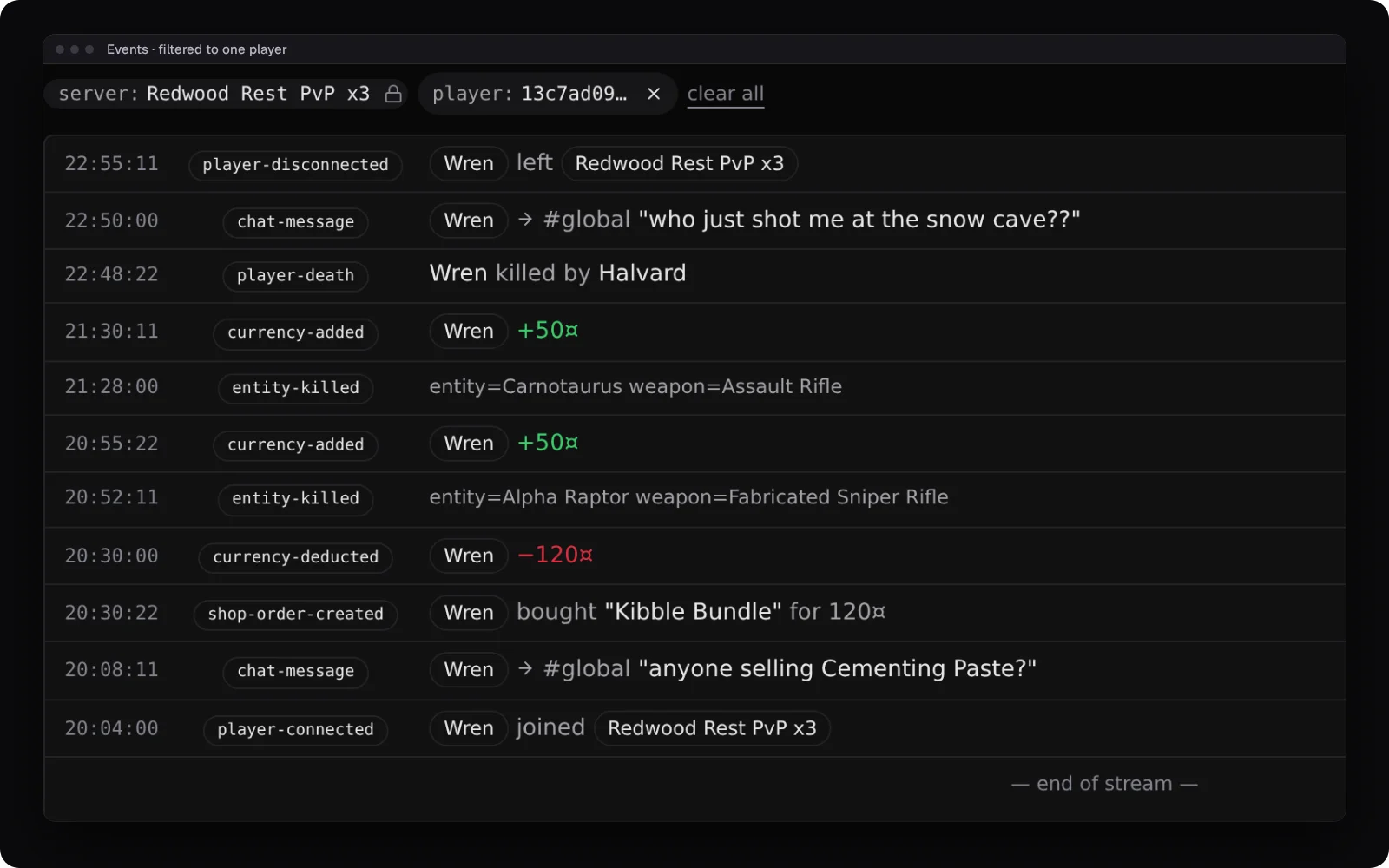
Patch night without the "is it down?" flood
(1) Scheduled messages tell everyone to get their dinos home. (2) A timed shutdown warns five minutes ahead and (3) stops the server, and ARK saves the world on the way out. (4) When players are back, your welcome message runs for each of them. Shutting down from Takaro needs RCONEnabled=True in the server settings; the RCON port can stay closed.
Browse the modules →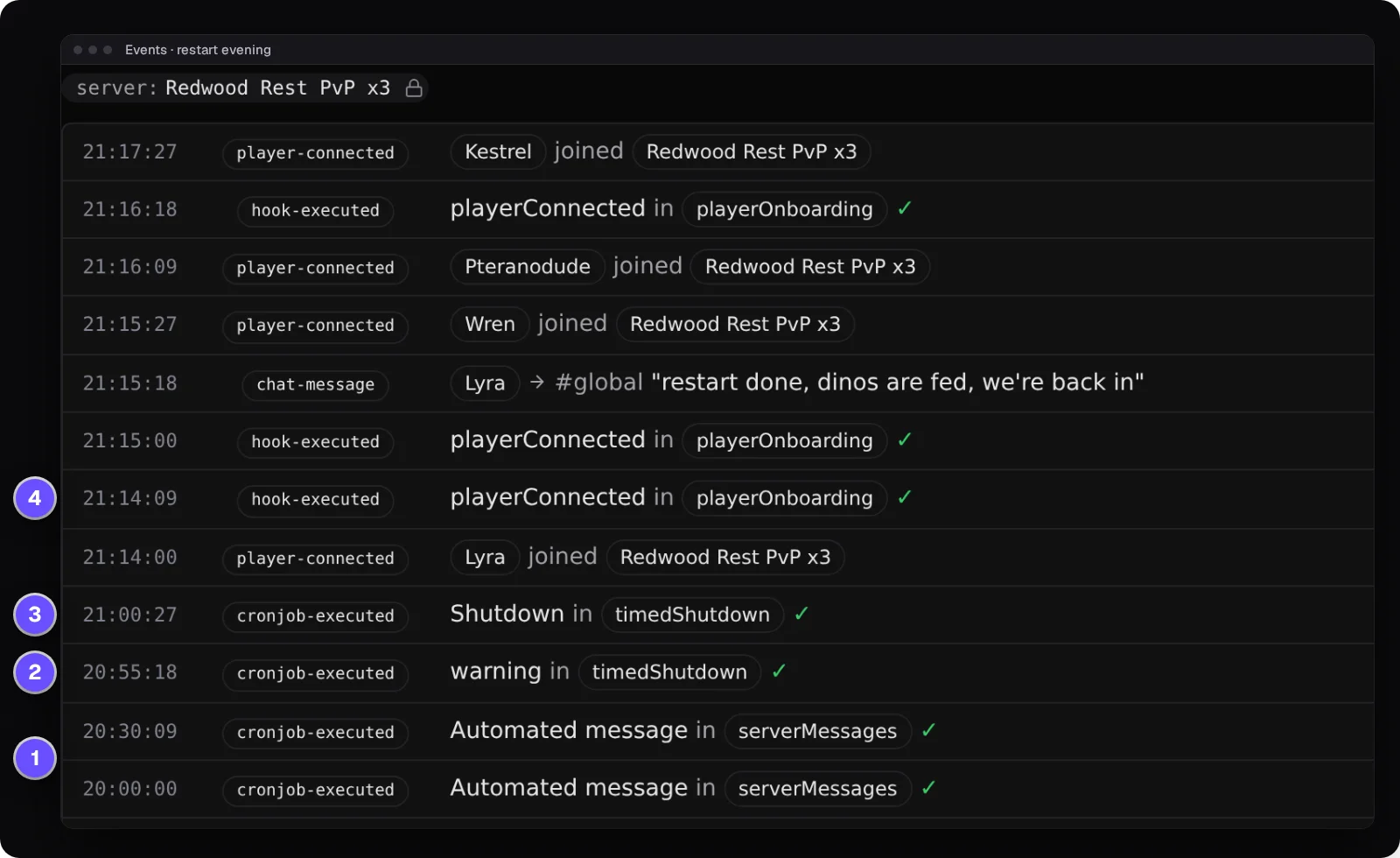
Everything else for your ARK: Survival Ascended server
Every survivor, with their level
Each survivor is its own character in Takaro, with its level and experience. Create New Survivor starts a new one.
Give items by name and quality
Search "Metal Ingot", not a blueprint path, and set the amount and quality. It lands in the player's inventory.
Discord chat both ways
Global chat lands in a Discord channel you pick, and replies typed there show up in game, so the tribe that's offline still follows along.
A points shop
Players earn your server's currency, buy kits in your shop and get them in game, like a give from an admin.
Download the ARK: Survival Ascended connector
Native connector for ARK: Survival Ascended dedicated servers: one AsaApi plugin inside ArkAscendedServer.exe that connects to Takaro itself, no sidecar.
Before you start
- ARK: Survival Ascended Windows dedicated server (Steam app 2430930) build named in the release
- File access to the server's ShooterGame\Binaries\Win64 folder and to its start command
- RCONEnabled=True in GameUserSettings.ini for console commands and shutdown
- Takaro registration token
Latest release
Next steps
- Create the server in the Takaro dashboard and copy its registration token.
- Stop the server, unzip the zip for your server build into
ShooterGame\Binaries\Win64, paste the code Takaro gives you intoTakaroConfig.txt, and start the server withAsaApiLoader.exeinstead ofArkAscendedServer.exe.
Full ARK: Survival Ascended install guide →
Previous versions (1)
Free to start. Upgrade when you grow.
The free tier includes one server with all modules, full API access, and Discord integration. Paid plans start at €7.99/month.
ARK: Survival Ascended server management FAQ
Is this the same as the ARK: Survival Evolved plugin?
No. Ascended has its own connector, an AsaApi plugin for Windows servers. For Survival Evolved on Linux, see the ARK: Survival Evolved page.
Does it work on a rented ARK server (Nitrado and others)?
Only if you can put files in ShooterGame\Binaries\Win64 and change the command that starts the server. A locked-down rented server without file access can't use it.
Does it run on Linux?
It's built for Windows dedicated servers. Running the server on Linux through Proton isn't tested.
What happens when ARK updates?
The connector stops until the AsaApi community publishes support for the new server build, and then there's a Takaro release for it. Takaro can't speed that up. If you don't want a gap, hold back server updates until the release is out.
How do I ban someone from an ARK: Survival Ascended server?
Open the player in Takaro and ban them, for good or for a set time, online or offline. The ban holds through restarts. Bans made in game show up in Takaro's ban list too. See how bans work.
Is there a live map?
Yes, on The Island: Takaro's map shows your players on a grid, and the Tracker replays where they were. For the in-game map as background, upload a picture of The Island once. Other maps have no map in Takaro.
Steam or Epic, how are players matched?
Steam players carry their Steam ID, so they're the same player as in your other Steam games. Other players carry their Epic (EOS) ID.
Do survivors have to install a mod?
No. The plugin runs inside the server and connects to Takaro by itself. Survivors join with the game as it is.
Can I manage multiple ARK: Survival Ascended servers from one dashboard?
Yes. Add as many servers as your plan allows. The free tier includes one server; paid plans cover two to eight, all from a single dashboard.
Is Takaro a replacement for my server host?
No. Takaro is a management layer on top of the server you already run. You keep your hosting provider; Takaro connects to the server and adds economy, teleports, moderation and analytics.
Can I write custom modules?
Yes. Takaro modules are commands, hooks and cron jobs you can write yourself, and the REST API is open for anything a module cannot reach.
How much does it cost?
The free tier covers one server with every module included. Paid plans start at €7.99/month for two servers. See all plans.
Is ARK: Survival Ascended support official?
Yes. Takaro builds, tests and releases this connector itself, with versioned releases and a documented install. Bugs go to the connectors repository.
Ready to manage your ARK: Survival Ascended server?
Install the connector, connect, and start adding features in minutes.
Running more than one game?
One Takaro account runs every game below, with one player profile across all of them.