Blueprints
A Blueprint is a ready-made setup for your server. Pick the kind of server you run, choose the parts you want, check one plan, and Takaro adds the modules, the shop listings and the roles in one go.
Blueprints work on 7 Days to Die servers. Your server must be connected and online. For what a Blueprint brings at a glance, see Blueprints on takaro.io.
Open Blueprints
Section titled “Open Blueprints”Start from any of these:
- Getting started checklist: Start with a Blueprint. Already have modules? It reads Add more with a Blueprint.
- Your server in the sidebar, then Blueprints.
- A server with no modules yet: the overview shows a one-line hint. Select Open Blueprints.
- Modules → Installed: Apply a Blueprint.
You need the Read Modules permission to see the page.
Set up your server in four steps
Section titled “Set up your server in four steps”1. Pick the kind of server
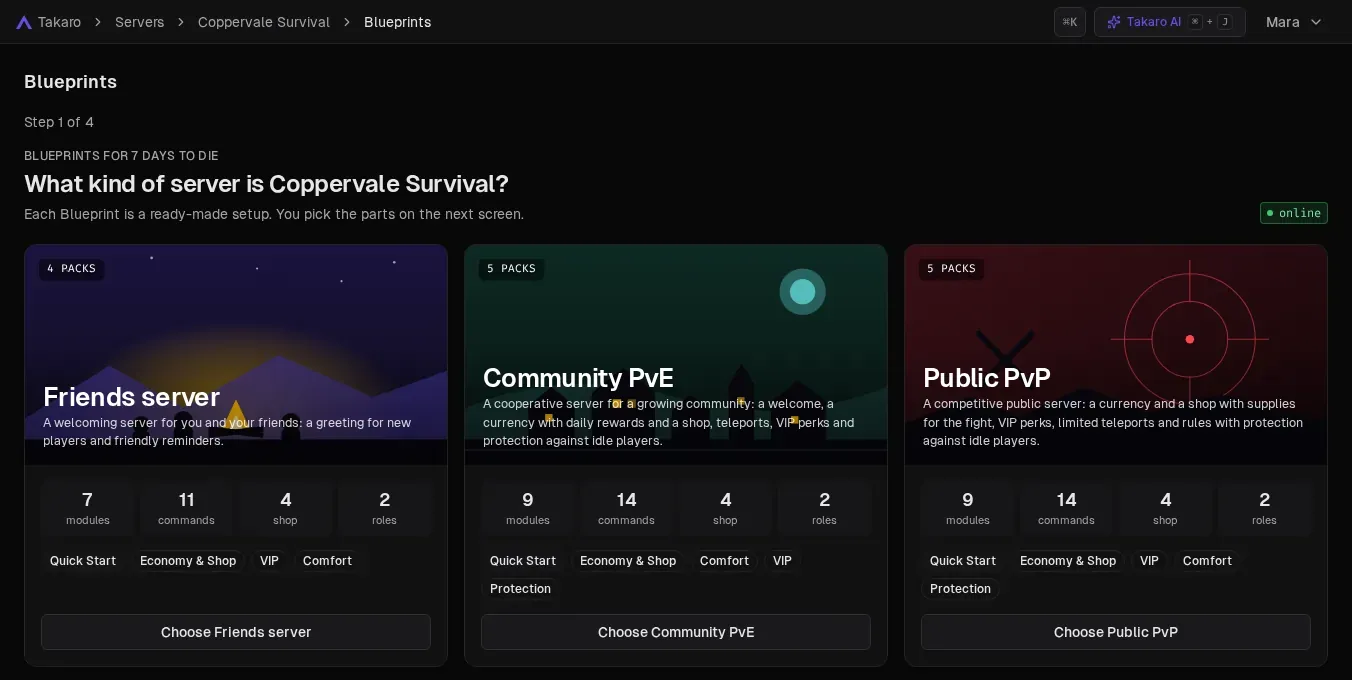
Section titled “1. Pick the kind of server”Takaro asks one question: what kind of server is this? Pick Friends server, Community PvE or Public PvP. Each card lists its Packs and how many modules, commands, shop listings and roles it brings.
A Pack is a bundle that does one job, like welcoming new players or running a shop.
2. Build your loadout
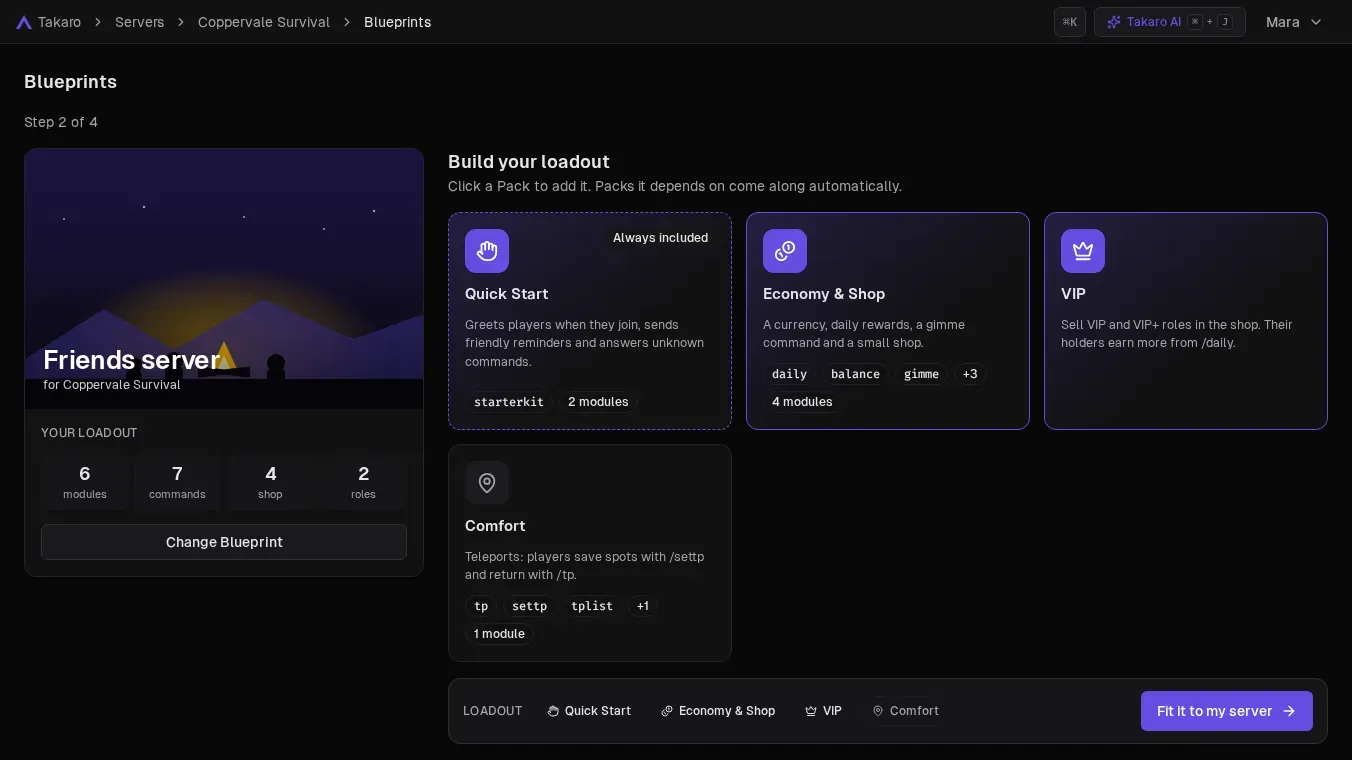
Section titled “2. Build your loadout”Click a Pack to add it or leave it out. Quick Start is always included. If a Pack needs another Pack, that one comes along. The loadout on the left shows what you end up with.
3. Fit it to your server
Section titled “3. Fit it to your server”Select Fit it to my server. Takaro AI looks at what you already have: your shop, roles and modules. Already have a VIP role, or an economy module set up the way you like? It suggests reusing it instead of making a second one, and asks you before it reuses anything. This uses your community’s Takaro AI allowance.
4. Check the plan, then apply
Section titled “4. Check the plan, then apply”Here’s the plan shows every change in four columns:
| Column | What it means |
|---|---|
| New | What Takaro adds to your server. |
| Changed | Tweaks to what you have, like letting the Player role claim /daily rewards. |
| Kept | What you already had, reused. |
| Left out | The Packs you skipped. |
Every shop listing and its price is in the plan, so check them here. The listings go live when you apply; change or unpublish them later in Shop → Storefront. See Shop.
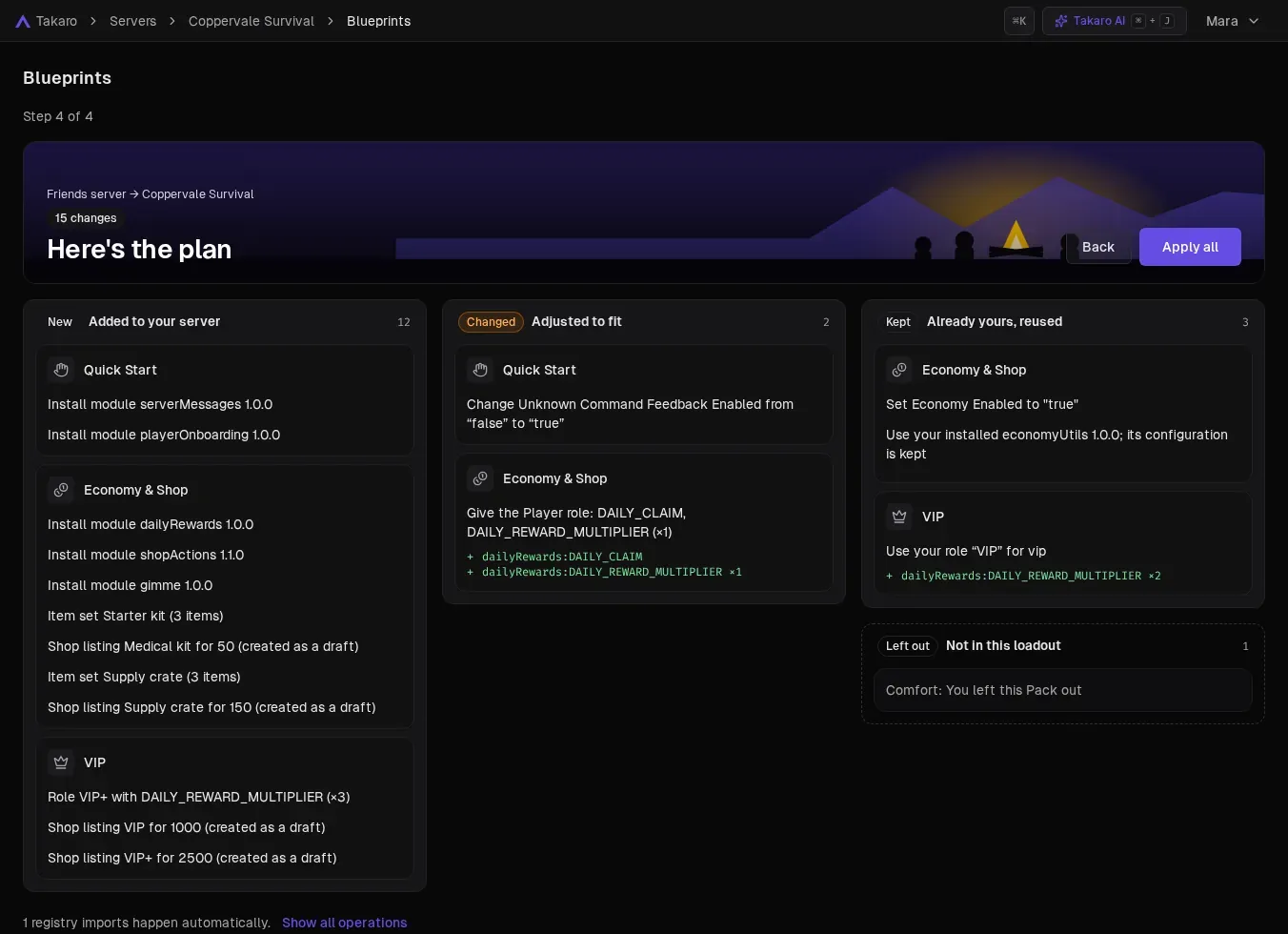
Select Apply all. Nothing changes on your server before that. Takaro then checks the result and tells you what your players can now do.
What each Blueprint brings
Section titled “What each Blueprint brings”| Blueprint | Packs | For |
|---|---|---|
| Friends server | Quick Start, Economy & Shop, VIP, Comfort | You and your friends. |
| Community PvE | The Friends server Packs, plus Protection | A cooperative server for a growing community. |
| Public PvP | The same five Packs, tuned for PvP: medical kits and ammo in the shop, and a short wait before /tp |
A competitive public server. |
What the Packs do:
- Quick Start (always included): greets players when they join (playerOnboarding), sends reminders (serverMessages) and answers when someone types a command that doesn’t exist.
- Economy & Shop: turns on a currency (economyUtils),
/dailyrewards (dailyRewards),/gimmefor a random free item (gimme), a Starter kit players claim with/starterkit, and a small shop (shopActions delivers what players buy). - VIP: VIP and VIP+ roles for sale in the shop. Holders earn more from
/daily. - Comfort: teleports. Players save a spot with
/settpand go back with/tp(teleports). - Protection: warns and kicks idle players, and gives players
/rules,/onlineand/serverinfo.
Not sure which one fits? Pick the closest. You choose the Packs on the next screen anyway.
Good to know
Section titled “Good to know”- Apply again later. Run a Blueprint on a server that already has modules: Takaro keeps what you have and only adds what’s missing. Things a previous Blueprint already made show as done.
- If the apply fails, Takaro undoes what it changed and tells you about anything it couldn’t undo.
- Short on role slots? If your plan has no room for new roles, for example for the VIP Pack, the plan tells you and Apply all stays off until it fits. See pricing.
- Permissions: you can only apply what your role may do. If you miss a permission the Blueprint needs, Takaro lists it.
- Everything stays editable. The modules, listings and roles are normal Takaro modules, listings and roles. Change them in Modules, Shop and Roles and permissions.