Moderation and bans
Banned on one server, banned on all of them.
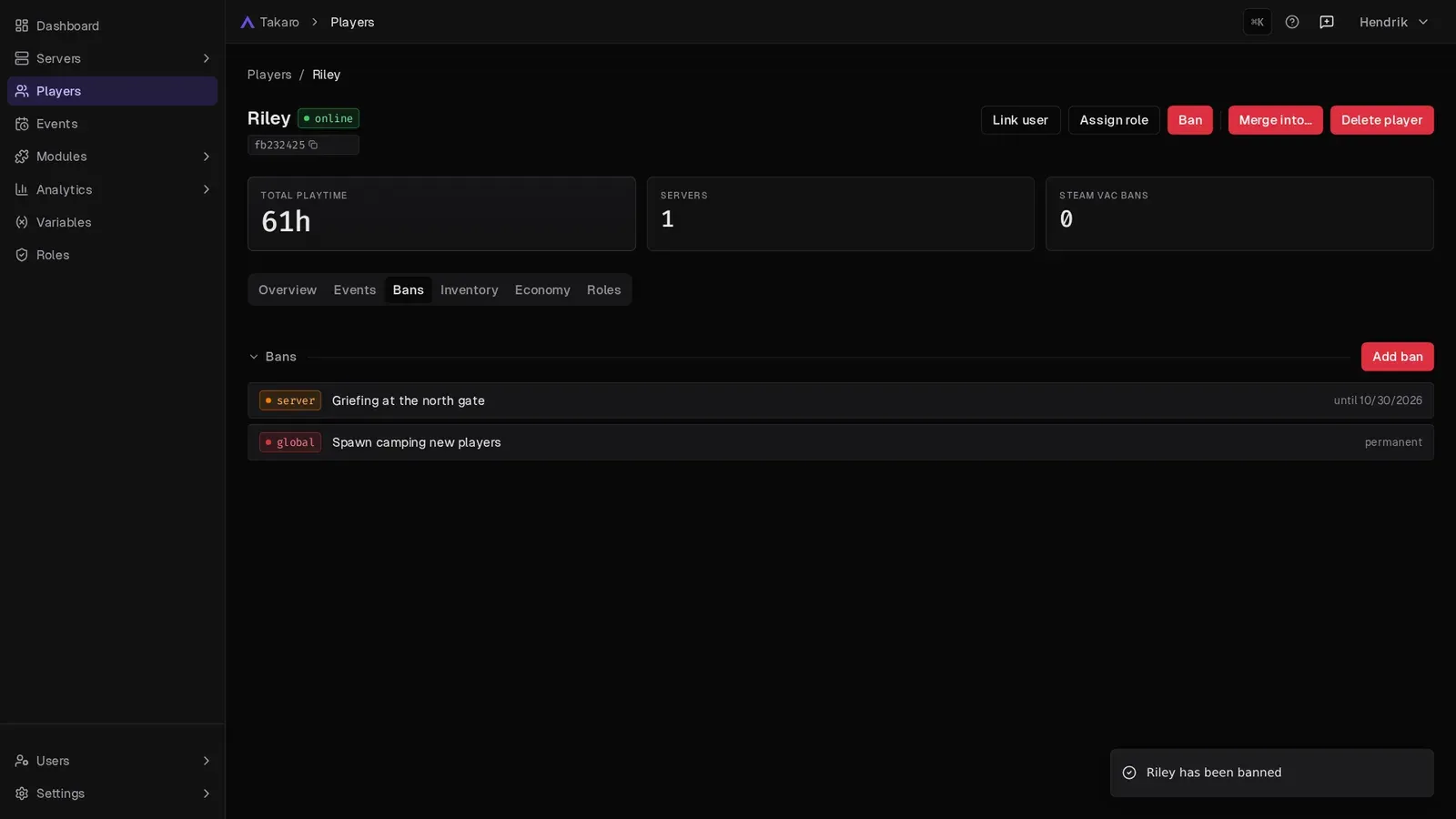
A cheater gets banned on your PvP server and turns up on your PvE server an hour later. Takaro is a ban tool for every server you run: one ban reaches all of them, whatever the game. It carries a reason and an end date, and comes back by itself after a wipe.
Included on every plan, the free one too.
Global bans
One ban, every server, every game
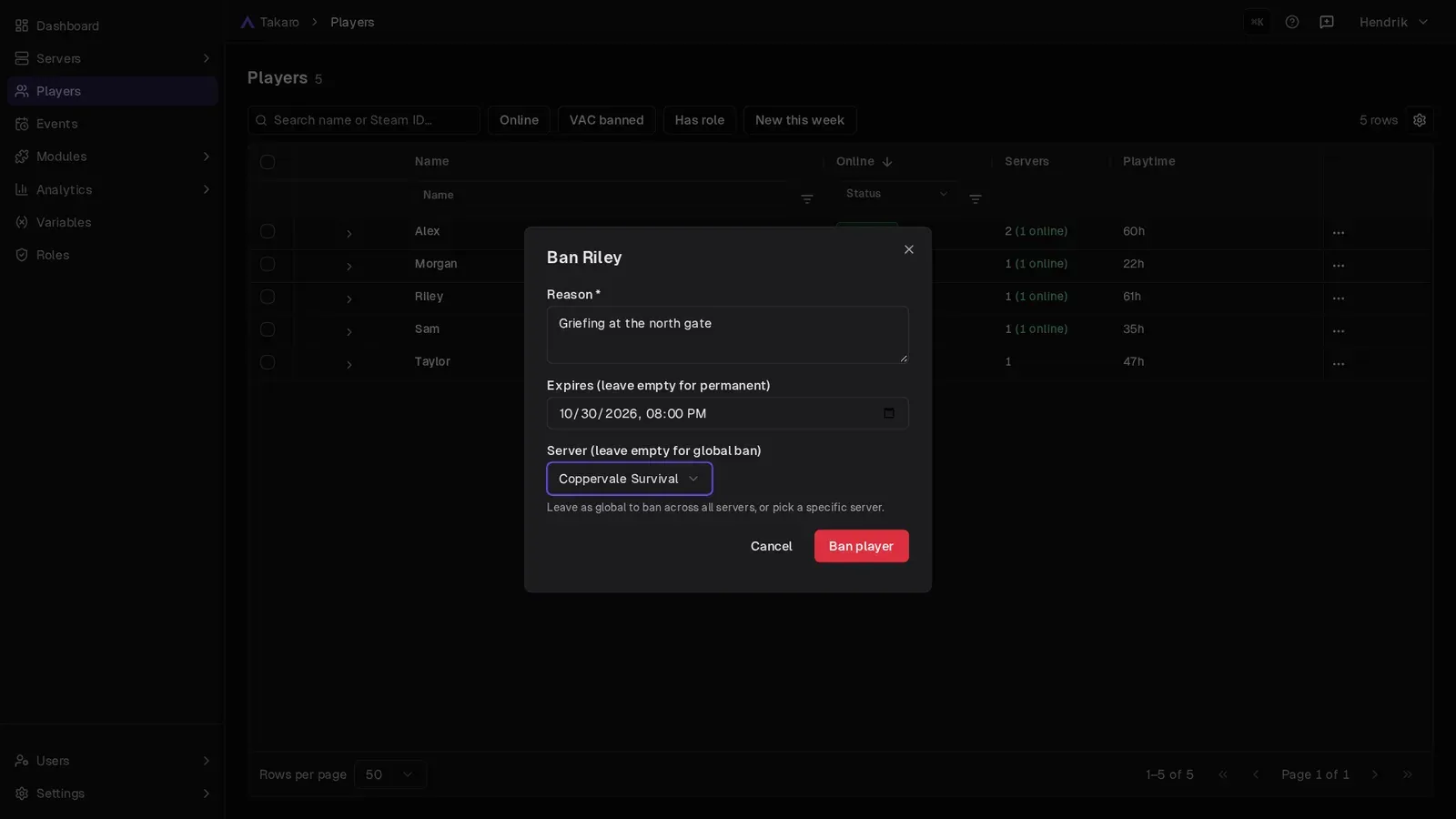
Each player has one Takaro profile, so a ban follows the person, not the server. Pick one server or keep Global ban (all servers).
- Timed bans lift themselves on games that support it. Each game page says how.
- Wiped the server? Takaro re-applies global bans on the next sync.
- Ban many players at once from a Players list, with one reason and one end date.
- Ask Takaro AI: "ban Robin for 3 days". It shows the ban and waits for your approval.
Steam standing
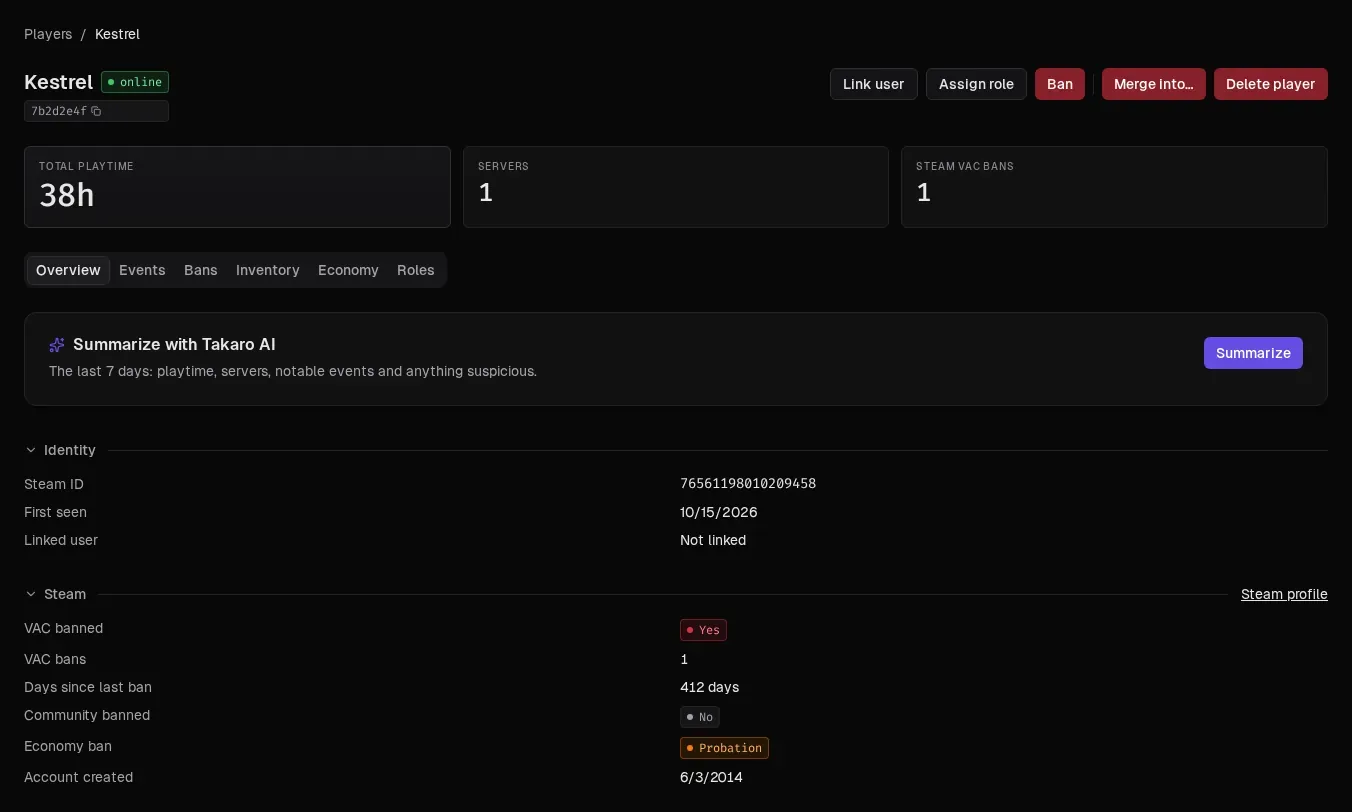
Check the VAC record before you decide
Every Steam player's profile shows their standing: VAC bans, days since last ban, community banned, economy ban and when the account was created. A two-week-old account with a fresh VAC ban reads differently from a ten-year regular.
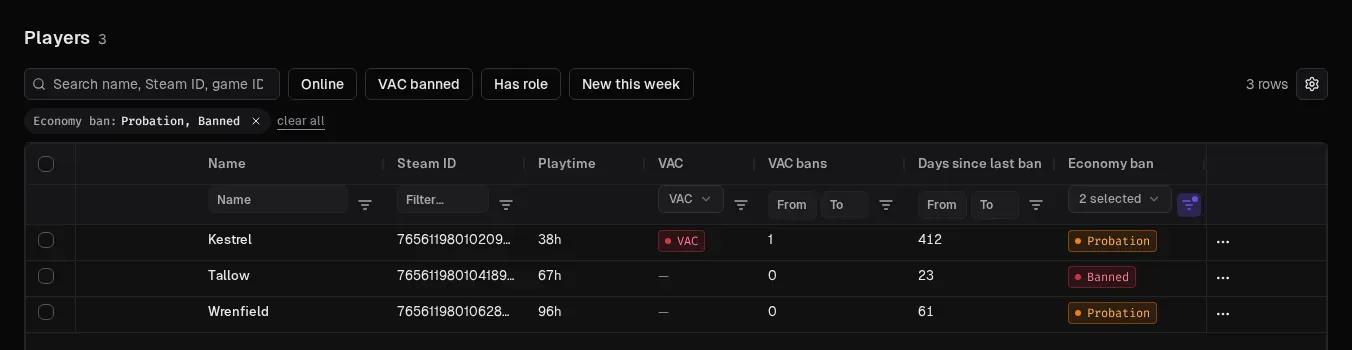
- Filter the Players list on any Steam column, for example everyone on economy probation.
- Known aliases and IP history on the profile help you spot a returning player.
- You make the call. Takaro shows the record; it doesn't ban on its own.
Moderator roles
Moderators who can ban, but can't ban you
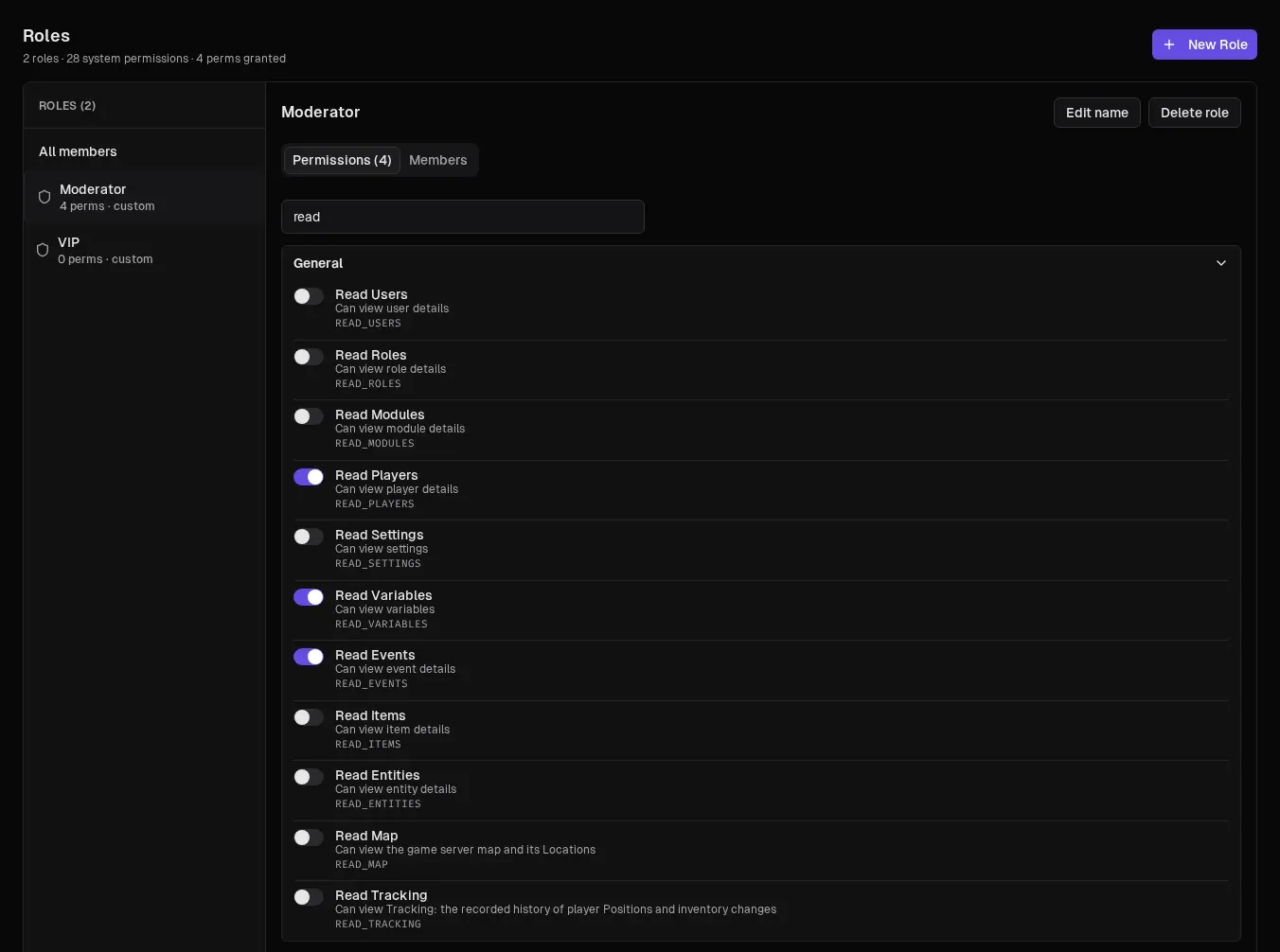
Give a new moderator a role with Manage Players and nothing else. They kick and ban from their browser, without your server login or your RCON password.
- A ceiling for every moderator. Nobody can ban, kick or edit someone who holds a permission they don't have.
- Roles too: a moderator can't edit or empty a role wider than their own.
- Takaro AI follows the same rule. An approved change counts as yours.
- Trial moderators? Give the role an end date and it lifts itself.
The record
Every ban, where your team will look
-
The Bans page
Every ban in your community with player, server, global or server scope, reason and end date. Filter by any of them.
-
The player's Bans tab
Their full ban history in one place, so a returning player's record is there before you decide.
-
Recent Bans on the dashboard
The five newest bans, so the whole team sees what happened overnight.
-
Events
Every ban and unban is a player-banned or player-unbanned event, so your modules can react to it.
How to ban
Ban a player in three steps
New to Takaro? Create a free account and connect your server first.
- 01
Open the player
From the Players list, a server's Players list or their profile, choose Ban.
- 02
Write the reason
Required, so your team knows why. Set Expires for a timed ban, or leave it empty for good.
- 03
Pick where
Keep Global ban (all servers) or pick one server, then choose Ban player.
Per game
A ban tool for every game you run
Each game handles bans its own way. Its page says how Takaro works with it.
- 7 Days to Die ban tool
- ARK: Survival Ascended ban tool
- ARK: Survival Evolved ban tool
- Astroneer ban tool
- Conan Exiles ban tool
- DayZ ban tool
- Dune: Awakening ban tool
- Eco ban tool
- Empyrion - Galactic Survival ban tool
- Enshrouded ban tool
- Hytale ban tool
- Minecraft ban tool
- Myth of Empires ban tool
- Palworld ban tool
- Project Zomboid ban tool
- RuneScape: Dragonwilds ban tool
- Rust ban tool
- SCUM ban tool
- Team Fortress 2 ban tool
- Terraria ban tool
- Valheim ban tool
- VEIN ban tool
How do I ban a player from all my game servers at once?
Open the player in Takaro, choose Ban and keep Global ban (all servers). The ban goes to every server they have played on, and new servers get it too. If a server loses it, for example after a wipe, Takaro bans them again on the next sync. See Bans.
Do timed bans lift themselves?
Yes. Set Expires and Takaro sends that end date to your game server. On games without ban expiry, the game page says how Takaro handles it.
How do I unban a player?
Can Takaro show if a player is VAC banned?
Yes, for Steam players. The player profile shows VAC bans, days since the last ban, community and economy bans and when the account was created. In the Players list you can show those columns and filter on them. Takaro shows the standing; you decide whether to ban. See Steam standing.
Can a moderator ban an admin?
No. A team member can only ban, kick or edit people who hold no permission they don't have themselves. Takaro refuses and names the missing permission. See Roles and permissions.
Is moderation a paid feature?
No. Bans, global bans, Steam standing and roles are on every plan, the free one too. See pricing.
One ban list for every server.
Free for your first server. Bans, Steam standing and roles included.
Not ready yet? Get the newsletter: new features, modules and tips. No spam.